Breaking the Monolith with Nutanix Cloud Infrastructure and Traefik Hub



You have a monolith running on a VM. It works. It has worked for years. But the pressure to modernize is real: new features take too long, scaling is expensive, and the teams building on it are stepping on each other's toes.
The instinct is to rewrite everything. Stand up a Kubernetes cluster, containerize the whole thing, and flip the switch. But if you have been in this industry long enough, you know how that story usually ends. Months of work. A missed deadline. A rollback. A very quiet retro.
There is a better way. And if you are running Nutanix, you already have the infrastructure to do it.

The Real Blocker Is Not Containers
Most modernization efforts stall before a single microservice is shipped. The blocker is not Kubernetes. It is not containerization. It is the gap between the VM world, where the monolith lives, and the container world where you want to go.
You can’t extract a service if you can’t route traffic to it. You can’t validate a new service if you can’t observe it handling real requests. And you can’t do any of this safely if authentication is applied differently at every layer.
The first move is not to break anything apart. The first move is to unify your traffic layer.

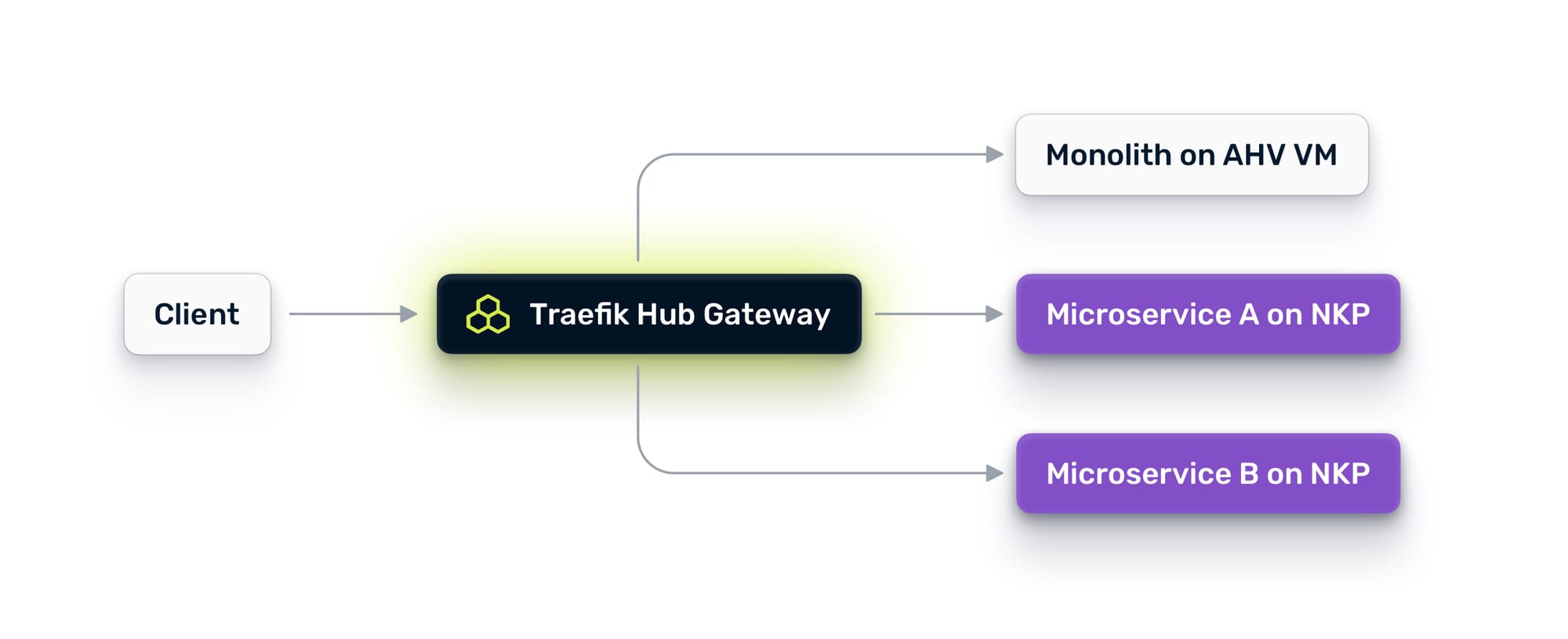
With a unified traffic layer, you get a single control point across all environments:
Why Nutanix Changes the Equation
Nutanix is unique here because it runs both compute substrates natively. Your monolith sits on AHV virtual machines. Nutanix Kubernetes Platform (NKP) runs containers right next to them on the same compute cluster, same storage, same network fabric. You don’t need to build a bridge between two clouds or two data centers. The bridge already exists at the infrastructure level.
What you need is an application-layer bridge: something that understands HTTP, can discover services across both VMs and Kubernetes, and gives you the traffic controls to move between them safely.
That is where Traefik Hub comes in.
Step One: Deploy Your Unified Ingress Across VMs and Kubernetes
Before you think about microservices, you need a single entry point for all traffic. Today, your monolith probably handles its own ingress, or sits behind a legacy load balancer that knows nothing about your containers.
The first step is to deploy Traefik Hub in two places:
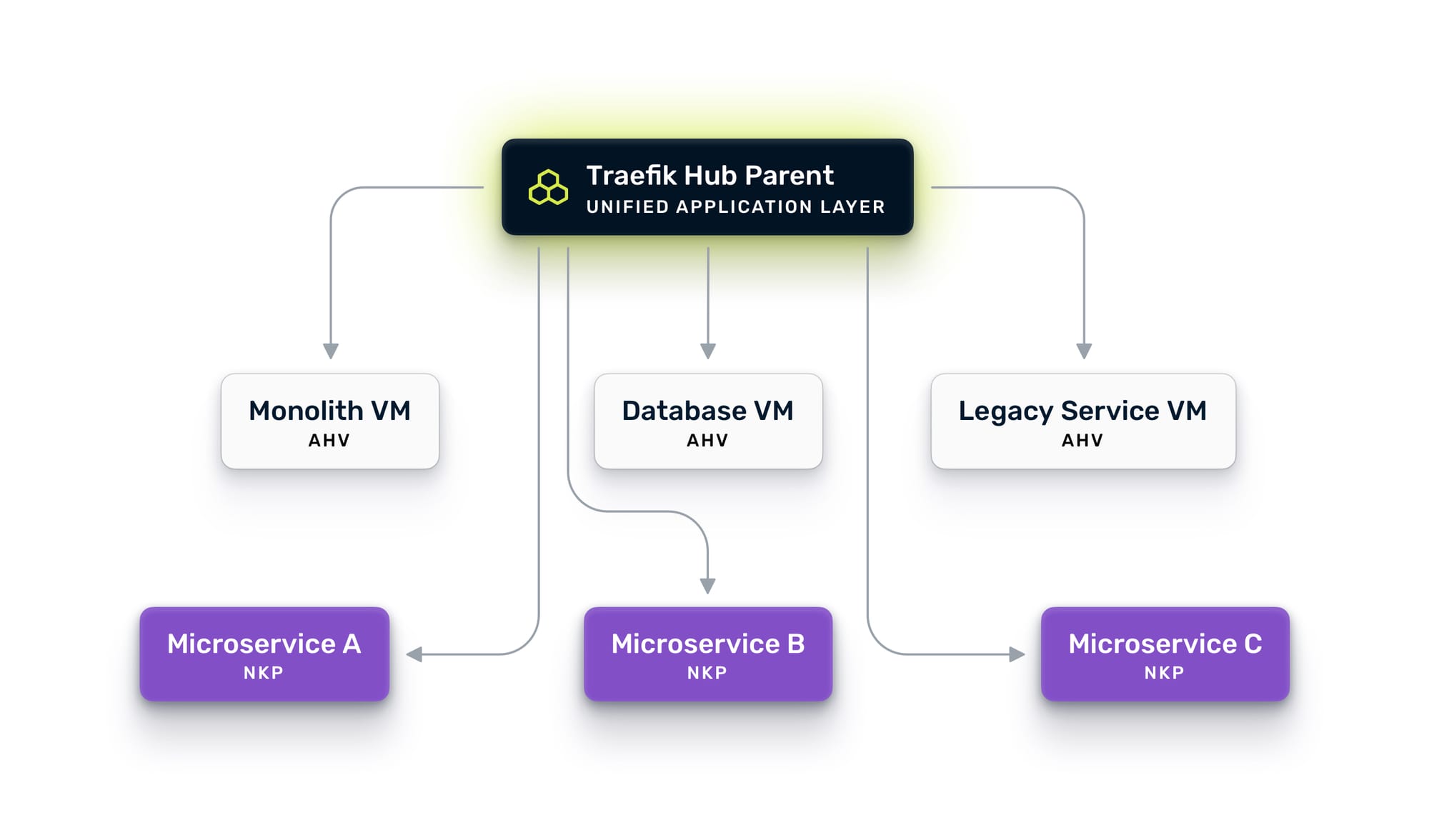
On NKP, upgrade to Traefik Hub. NKP already ships with a Kommander-managed Traefik instance for platform ingress, so the technology is familiar. You install Traefik Hub via Helm alongside it, using ingress classes to separate responsibilities. The Kommander instance keeps its existing ingress class for platform traffic, while Traefik Hub uses a dedicated class for application traffic. The NKP instance becomes your parent gateway, the central routing brain for all traffic.
On AHV, install Traefik Hub directly on a VM in the same VPC or subnet as your monolith. No Kubernetes required. Traefik Hub runs as a native binary on Linux, provisioned via cloud-init when you spin up the VM in Prism Central. It connects to the Nutanix Prism Central API and automatically discovers your VMs using category tags. Tag a VM with TraefikServiceName: orders and Traefik picks it up within seconds.
Now, let's connect them. Traefik Hub's multi-cluster capability uses a parent-child architecture where the NKP instance acts as the parent and the AHV instance registers as a child. The child exposes an uplink entry point on a dedicated port, and the parent automatically discovers all advertised workloads. Communication between them is secured with mutual TLS.
The result: a unified gateway on NKP that can route traffic to containers running in Kubernetes and to services running on VMs. One control plane. One set of routing rules. One place to enforce policy. Your monolith is now accessible through the same gateway that will serve your future microservices.
Lock Down the Network with Nutanix’s Flow Microsegmentation
Unified ingress solves the north-south problem: how traffic gets in. But a multi-cluster architecture also creates new network communication paths that need to be secured. There are two distinct concerns here, and Flow Network Security addresses both.
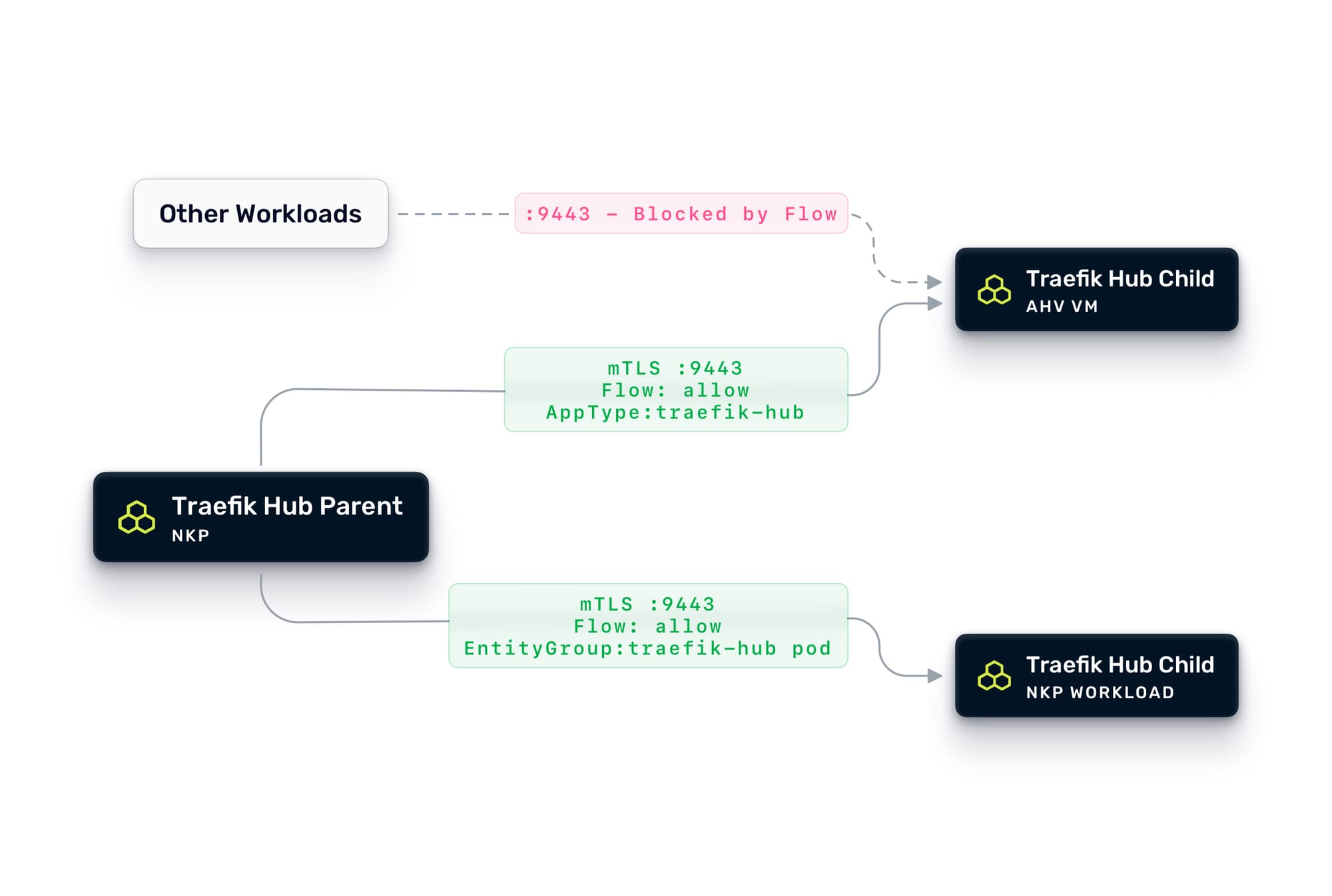
First: securing the Traefik-to-Traefik multi-cluster communication. The parent gateway on NKP communicates with child instances on AHV VMs and other NKP clusters via mTLS on the uplink port (9443 in this example). At the application layer, mutual TLS ensures that only the parent can connect to the child and vice versa. But at the network layer, you should also lock this down with Flow.
First, we need to define an Entity Group that will reference the Traefik Hub pods inside the NKP clusters, and tag the Traefik Hub VMs with AppType: traefik-hub category. Then we can create an application policy that allows traffic on port 9443 only between VMs tagged with AppType: traefik-hub and pods selected with the Traefik Entity Group. Everything else trying to reach that port gets dropped. This ensures that even if something else on the network tries to probe the uplink endpoint, it never gets through.
Second: securing east-west traffic between workloads. This is where Flow microsegmentation shines. Flow is a distributed, stateful firewall built into the AHV hypervisor that enforces policies at the VM vNIC level, before a packet ever reaches another workload. When using NKP, Flow extends the same policy model to Kubernetes pods and services. The result is consistent network security enforcement across both compute substrates, managed from a single Prism Central console.
Traefik Hub Nutanix Prism Central provider uses Nutanix Categories for service discovery in an AHV environment. Tag your monolith VMs with categories like AppTier: backend, and group your containerized microservices into Entity Groups based on their cluster, namespace and labels. Flow can then define exactly which workloads can talk to each other, on which ports, and in which direction, regardless of whether they run on VMs or Kubernetes.
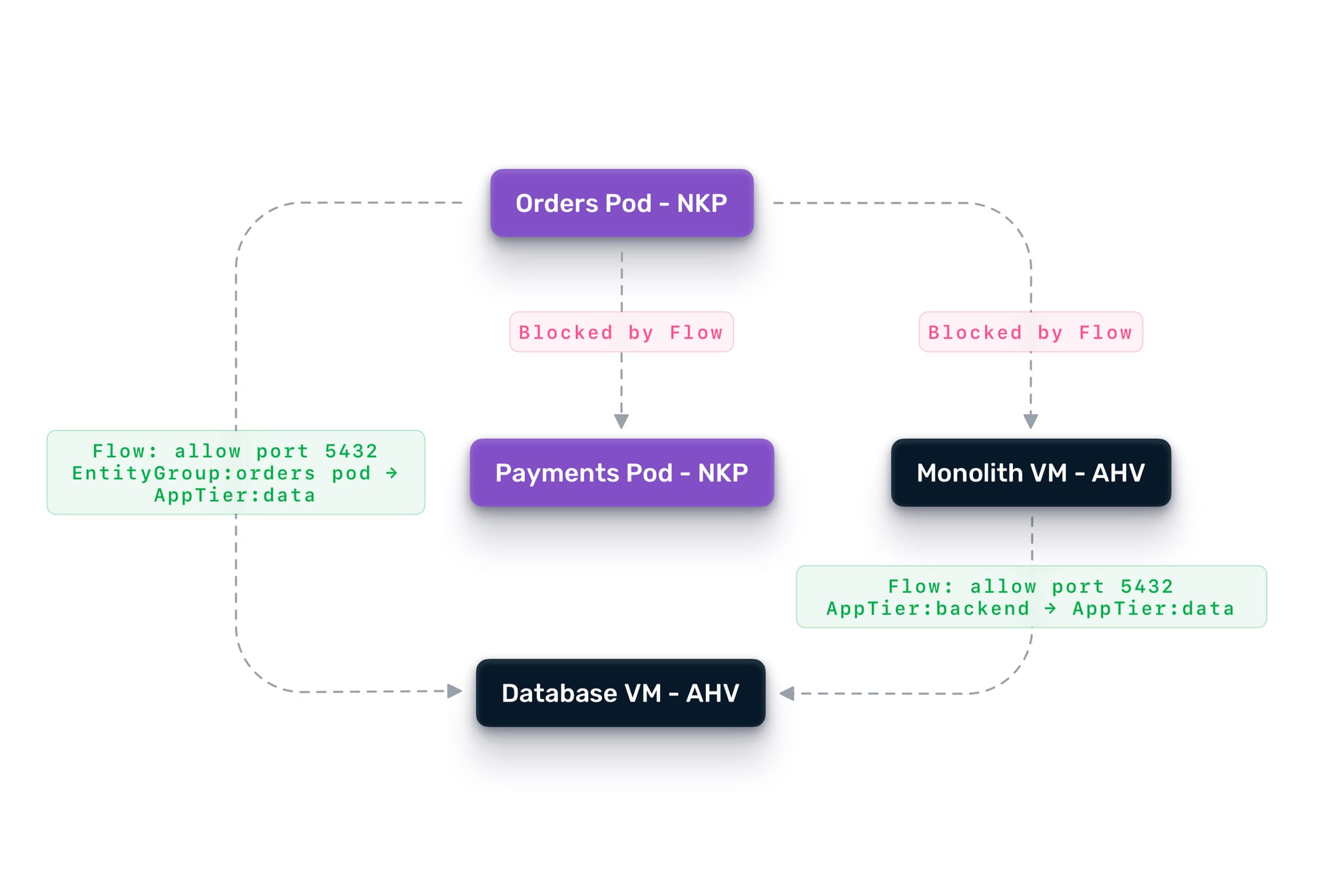
Together, these two layers create defense-in-depth. Traefik Hub handles application-level concerns at Layer 7—e.g., who is making the request, whether they are authenticated, whether they should be rate-limited, and which backend version should receive the traffic. Flow handles the network-level concerns at Layers 3 and 4—e.g., can this VM talk to that pod at all, on which ports, and in which direction.
In practice, this means you can tighten security as you decompose. When the orders service moves from the monolith to its own container on NKP, you create a Flow policy that allows the new orders pod to reach the database VM on port 5432, and nothing else. The monolith keeps its existing access. The new microservice gets only what it needs. If the orders pod is ever compromised, the blast radius is contained to what Flow explicitly permits.
Flow also supports quarantine policies. If your security tooling detects anomalous behavior from a workload, Flow can instantly isolate it, cutting off all network access while allowing forensic investigation traffic. This is especially valuable during a migration, where new services are being validated, and the risk profile is temporarily elevated.Finally, the same security model Flow applies to VMs extends directly to NKP. You define Entity Groups to identify which pods should receive which traffic, then reuse your existing VM rules, swapping the category tags that identified the monolith for the Entity Groups covering its containerized replacement. Both rule sets can run in tandem during the cutover, so the monolith and its microservice counterparts stay protected under a single, consistent policy throughout the migration.
Step Two: Establish Observability Before You Touch Anything
You now have a gateway in front of everything. Before you extract a single service, start leveraging it.
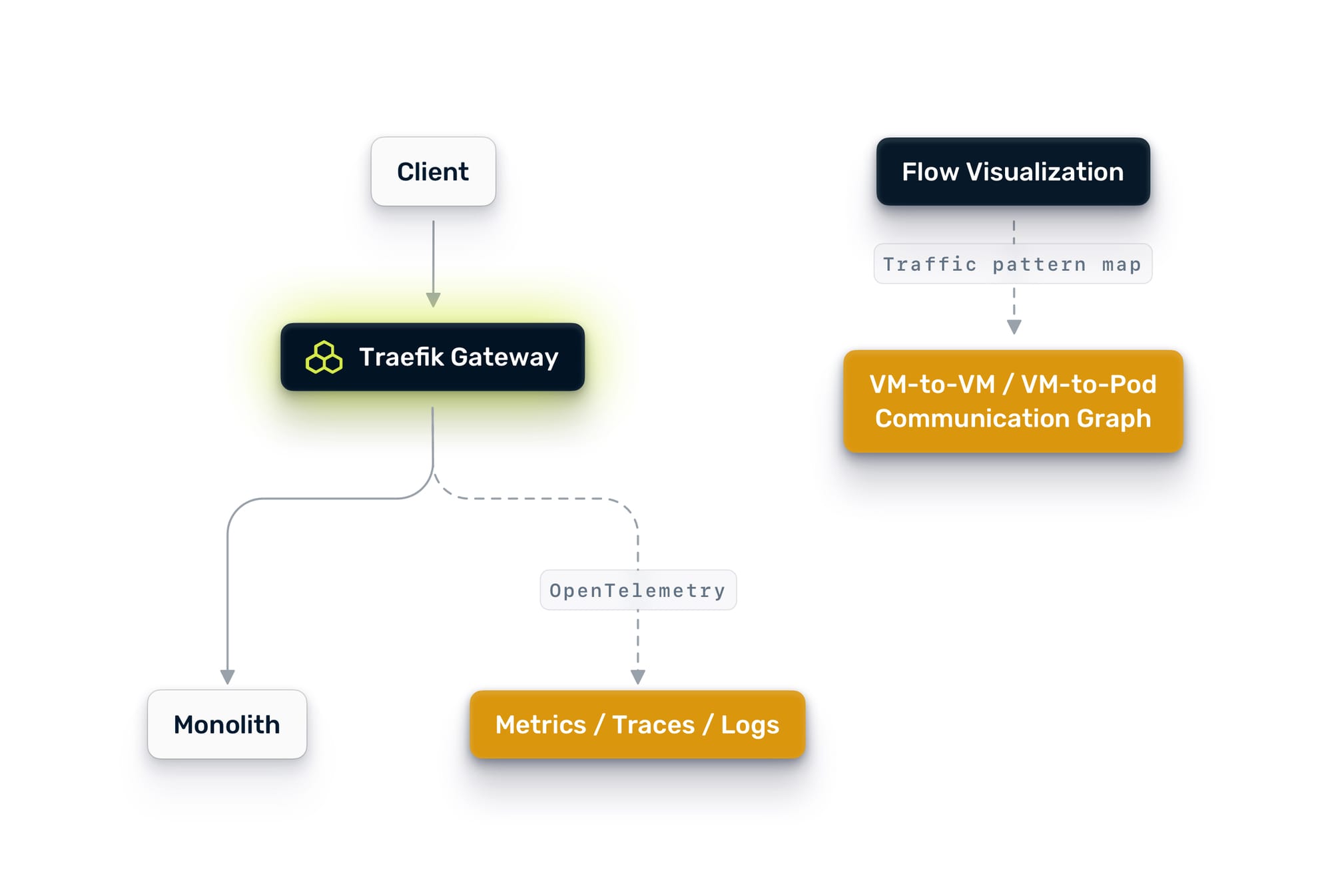
Traefik Hub emits OpenTelemetry metrics, traces, and logs out of the box. Point Traefik Hub's OpenTelemetry exporter at the your telemetry suite, and you will immediately get visibility into every request flowing through the gateway.
On the network side, Nutanix Flow also gives you something most teams wish they had before starting a decomposition: a visual map of actual traffic patterns across your monolith. Flow's traffic visualization shows you which VMs are talking to which other VMs, how often, on which ports, and in which direction. This is invaluable for understanding data access patterns. If you can see that the orders module only talks to the orders database and the notification queue, you have evidence that it is a good extraction candidate. If you can see that the pricing module reaches into six different backends, you know to leave it alone for now.
This is not optional. This is the foundation on which everything else depends. Between Traefik Hub's request-level telemetry and Flow's network-level traffic visualization, you need to answer questions like:
- Which endpoints get the most traffic?
- What are the current latency baselines?
- Which parts of the monolith are already isolated in terms of data access?
- Which VMs communicate with which backends, and how tightly coupled are they?
- Where are the error hotspots?
The answers to these questions tell you what to extract first and, just as importantly, what to leave alone. Many teams make the mistake of extracting the service they think is most important. The right choice is usually the service that is most independent, has the clearest boundaries, and causes the least disruption if something goes wrong. Flow's traffic map gives you hard evidence for that decision instead of guesswork.
Observability also gives you the before picture. When you start routing traffic to a new microservice, you need to compare its behavior against the monolith's baseline. Without that baseline, you are flying blind.
Step Three: Centralize Authentication
Before you split traffic between the monolith and new services, you need a consistent authentication layer. The goal is simple: one place where identity is verified, so every service behind the gateway can trust who is making the request.
If your organization already uses an OIDC-compatible identity provider (Keycloak, Auth0, Okta, Entra ID, or similar), Traefik Hub makes this straightforward. Configure the gateway to validate JWT tokens at the edge, so that every request that reaches your services is already authenticated. If you are not there yet, that is perfectly fine. Traefik Hub also supports basic auth, API keys, and custom header-based authentication. You can start with whatever your monolith uses today and evolve toward centralized identity at your own pace. The important thing is that the gateway becomes the single enforcement point, regardless of the mechanism behind it.
Here is the pragmatic part: it is perfectly fine to validate at the gateway and still have the monolith validate internally. You do not need to rip out the monolith's auth layer on day one. Configure Traefik to forward the validated credentials downstream so the monolith can continue to verify them as it always has. Over time, as you gain confidence, services behind the gateway can rely on the gateway's validation and skip their own.
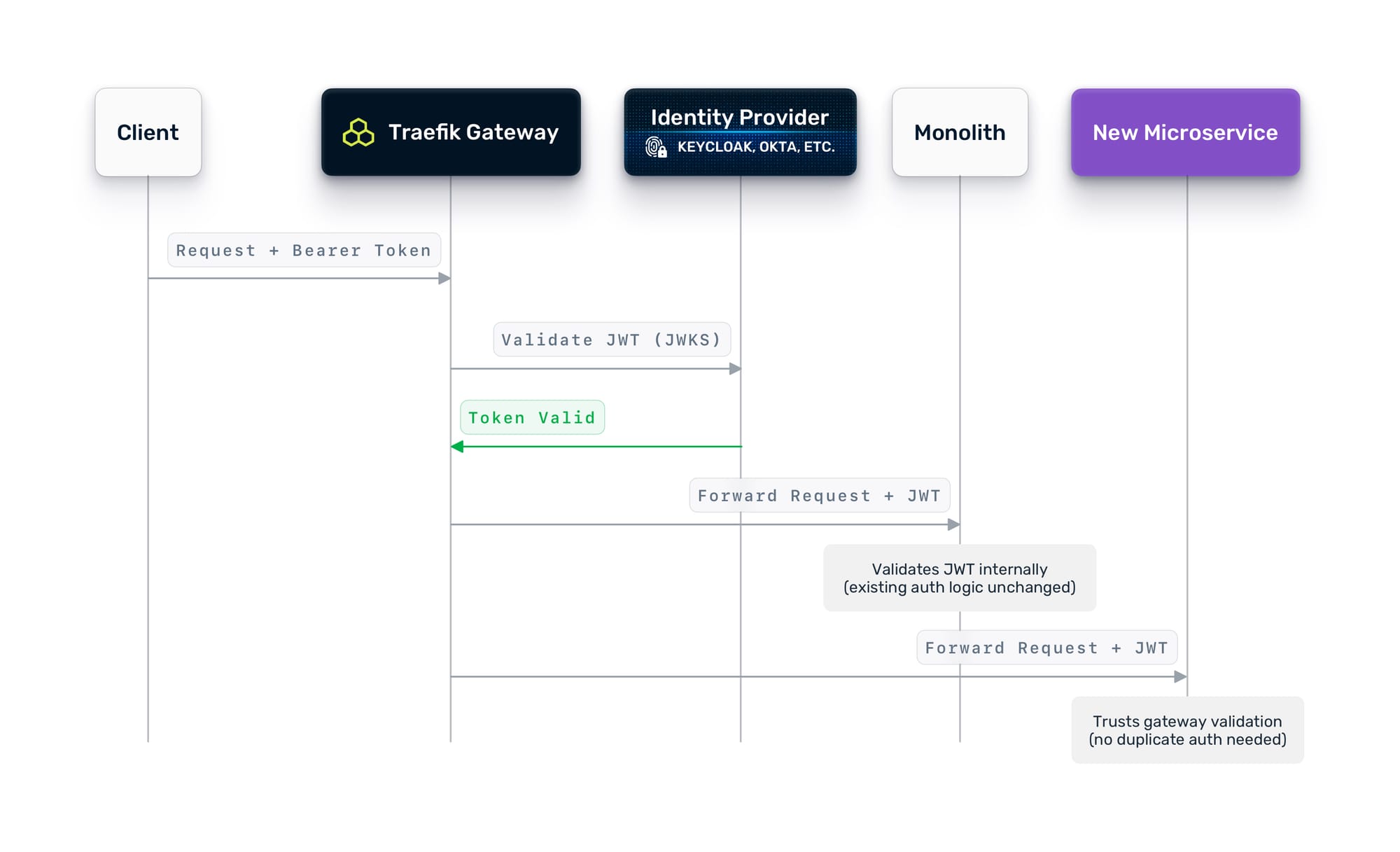
This approach means you do not need to change the monolith's auth logic to get started. The gateway adds a layer of centralized enforcement without requiring the monolith to change.
Step Four: Decide What to Extract
With the foundation in place, the real work begins: deciding what to decompose, in what order, and why.
How to Pick the First Service
Not every service is a good candidate for early extraction. Here is what to consider:
Domain Independence
Look for functionality with clear boundaries around data ownership and API surface. An orders service that reads from its own tables and exposes a clean REST API is a better first candidate than a pricing engine that reaches into six different database schemas.
Team Ownership The team that owns the domain should own the extraction. If you are extracting the notifications service, the team that builds and maintains notifications should drive it. They know the edge cases, the failure modes, and the quirks that no architecture diagram captures.
Risk ToleranceStart with something that has a fallback. If the new notifications microservice fails, can you queue the notifications and retry? That is a much safer first extraction than the payment service, where failure means lost revenue.
Data CouplingIf the candidate service shares a database with other parts of the monolith, you have a harder extraction ahead of you. Shared databases are the number one reason monolith decompositions stall. Either decouple the data first, or pick a service that already has its own data store. This is where Flow's traffic visualization pays off again.
Instead of relying on architecture diagrams that may be out of date, you can look at the actual network communication graph and see exactly which components access which data stores. A module that Flow shows talking to a single database is a clean extraction target. A module that Flow shows reaching into multiple different backends is one you should consider deferring.
Traffic PatternsYour observability data shows the request volume, latency profile, and error rate of each endpoint. Pick something with moderate traffic for your first extraction. Too low and you will not learn anything. Too high and a mistake impacts too many users.
What the Team Should Think About
Beyond picking the service, the team needs to align on a few things before code gets written:
- API contracts. Define the API surface of the new service before you build it. The monolith already exposes these endpoints. The new service needs to be a drop-in replacement from the client's perspective.
- Data migration strategy. If the new service needs its own data store, how do you migrate the data? Do you do it upfront, or run dual writes for a period?
- Error handling and fallback. What happens when the new service is down? Does the gateway fall back to the monolith? Does it return a cached response? Does it fail loudly? Decide this before you ship.
- Deployment independence. The whole point of microservices is that teams can ship independently. If deploying the new service still requires coordinating with the monolith team, you have not actually decomposed anything.
Step Five: Implement the Strangler Fig Pattern
Now the migration starts. The pattern is called the Strangler Fig: new functionality grows around the old system, gradually replacing it piece by piece, until the original is no longer needed.
In a Nutanix environment with Traefik Hub, this pattern is controlled entirely through routing. You never need to change DNS records, update load balancer configs, or redeploy the monolith. Every change is a routing rule update.
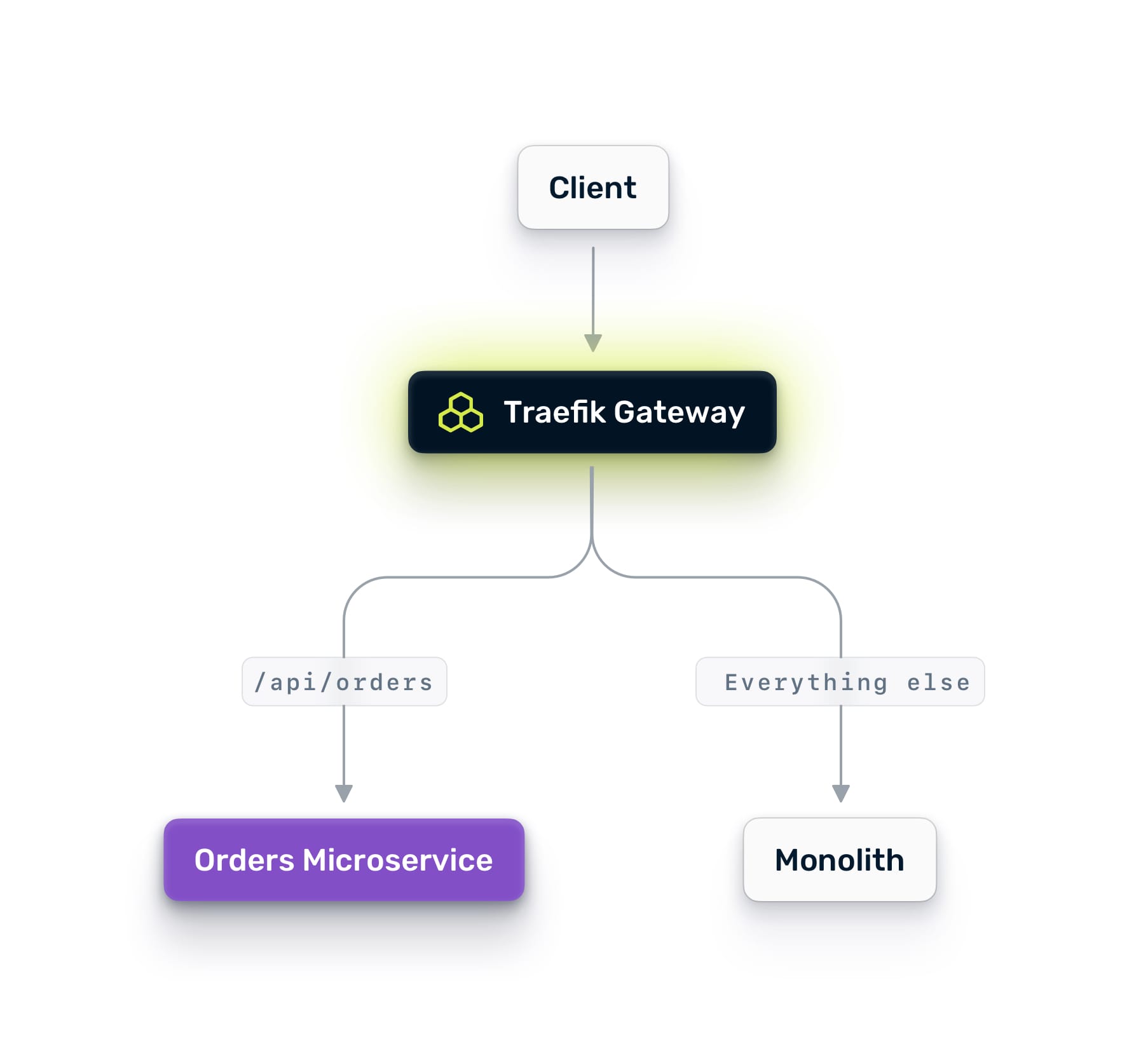
Phase 1: Mirror Traffic
Deploy your new microservice on NKP. Configure Traefik Hub to mirror a percentage of production traffic to it. Mirroring sends a copy of each request to the new service while continuing to serve all responses from the monolith. Users see no difference. The mirror's responses are discarded.
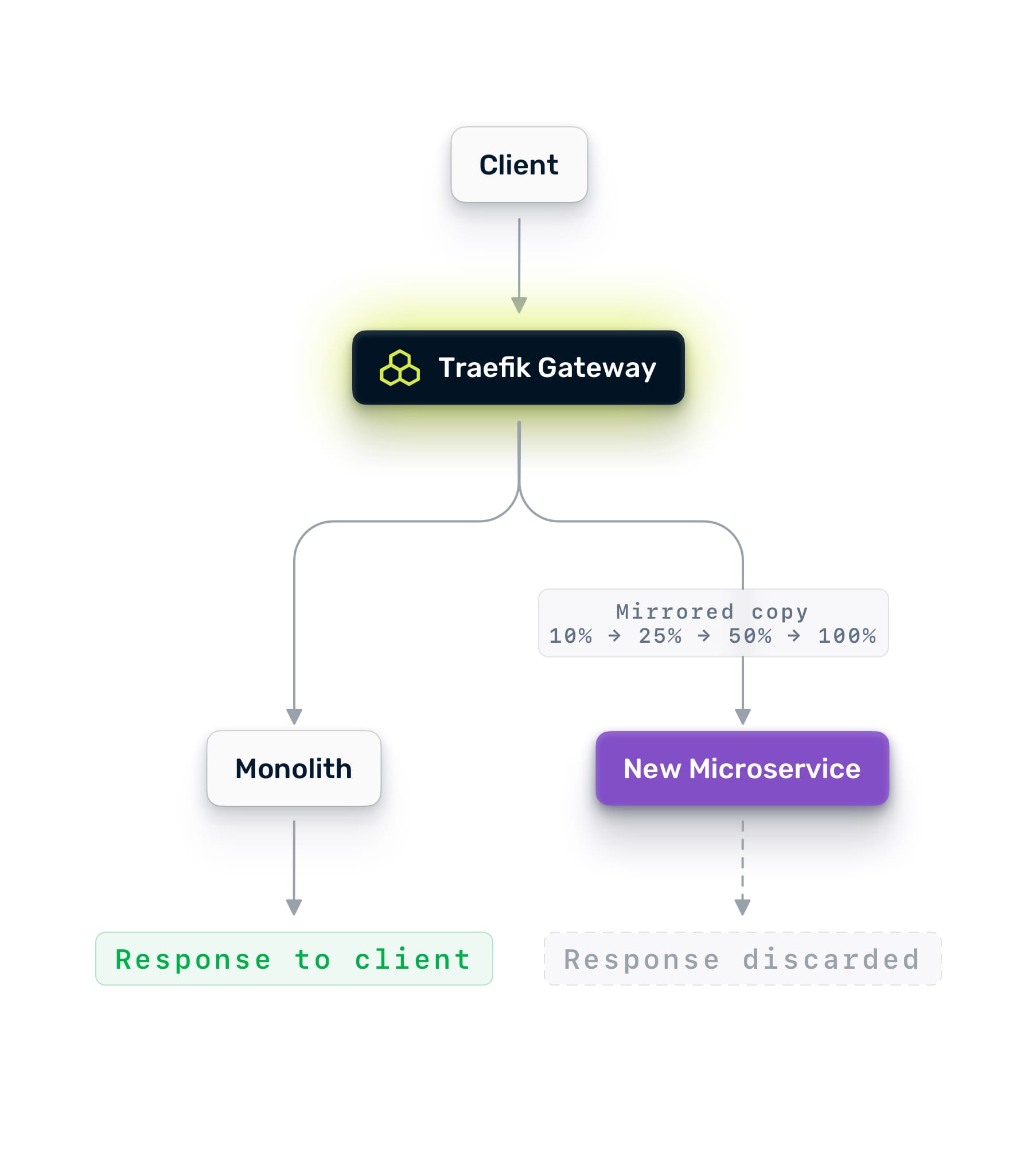
Start at 10%. Watch the new service's logs, traces, and error rates. Compare its latency against the monolith's baseline. If it handles 10% cleanly, ramp to 25%, then 50%, then 100%.
Mirroring is zero-risk validation. You are testing with real production traffic patterns, real payloads, and real edge cases. No amount of synthetic load testing gives you this level of confidence.
Phase 2: A/B Testing with Live Traffic
Once the microservice handles 100% of the mirrored traffic cleanly, you are ready to send real traffic. But not all of it. When the microservice successfully processes 100% of the mirrored traffic without issues, you can then begin directing live traffic to it. However, start with a partial rollout.
Use Traefik Hub's weighted round-robin to split traffic between the monolith and the new service. Start with 10% going to the new service and 90% staying on the monolith. Monitor closely.
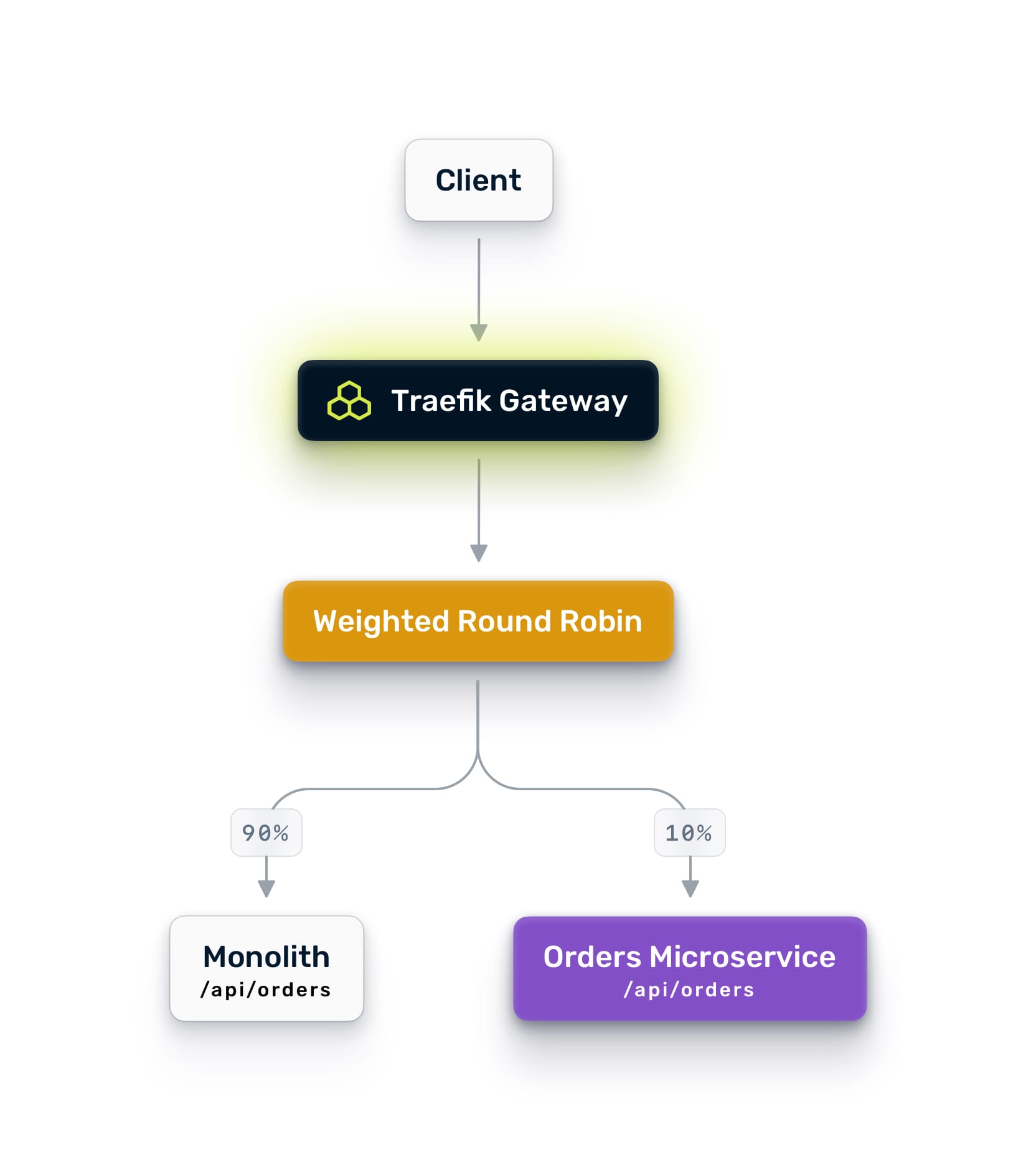
For more control, use identity-aware routing. Traefik can extract claims from JWT tokens and route based on user attributes. Send internal employees to the new service first. Then beta users. Then a broader cohort. This gives you surgical control over who experiences the new path.
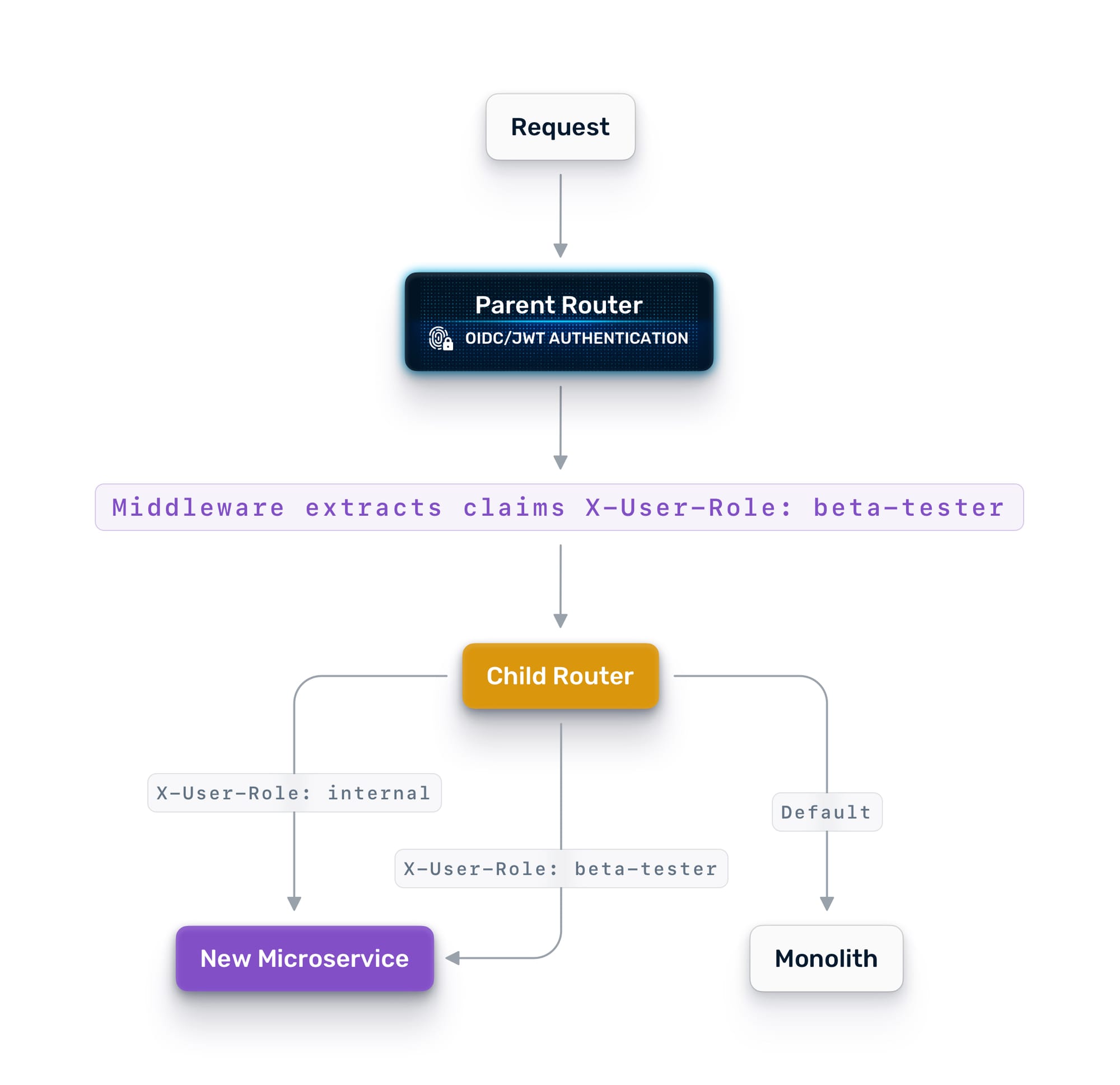
Sticky sessions ensure that once a user is assigned to a version, they stay there for their session. No one bounces between the old and new checkout flow mid-transaction. To prevent users from being switched between the old and new checkout processes mid-transaction, sticky sessions are employed. This guarantees that once a user is assigned to a specific version, they remain with that version for the duration of their session.
Phase 3: Gradual Cutover
As confidence grows, shift the weights. 5/95 becomes 10/90, then 25/75, then 50/50. At each stage, compare error rates, latency, and throughput between the two paths. If anything degrades, shift the weight back. No redeployment. No rollback pipeline. Just a configuration change.
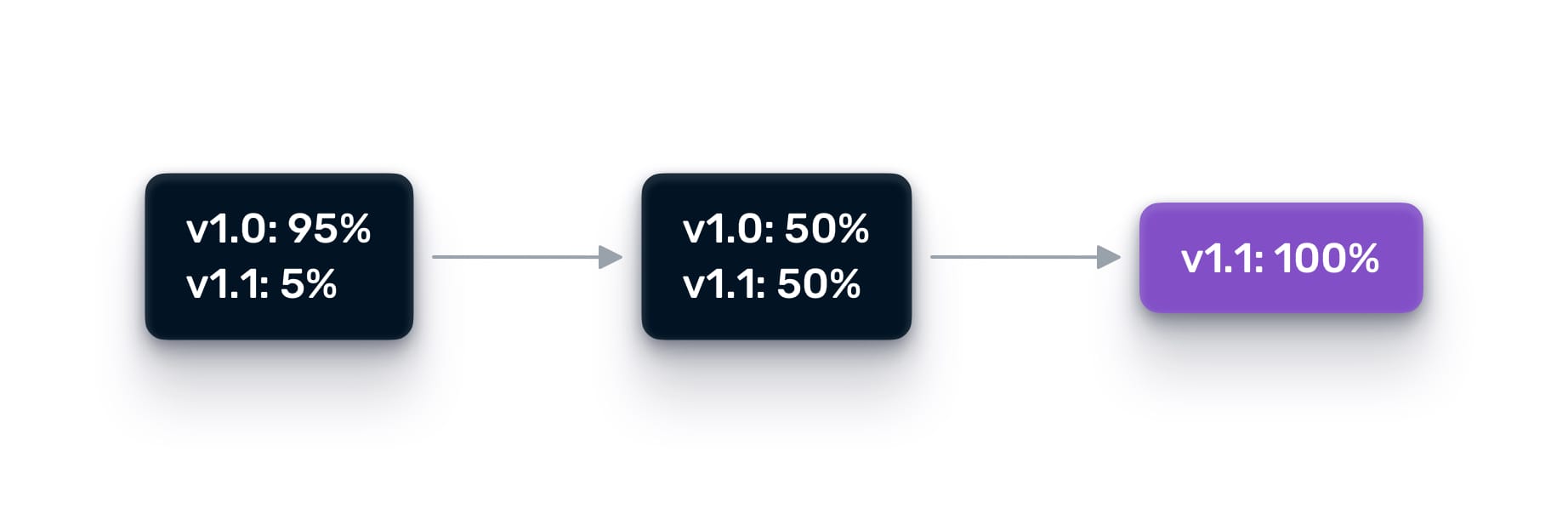
When you reach 100% on the new service, keep the monolith endpoint alive for a while as a failover target. Traefik Hub's failover service automatically redirects traffic back to the monolith if the new service fails health checks.
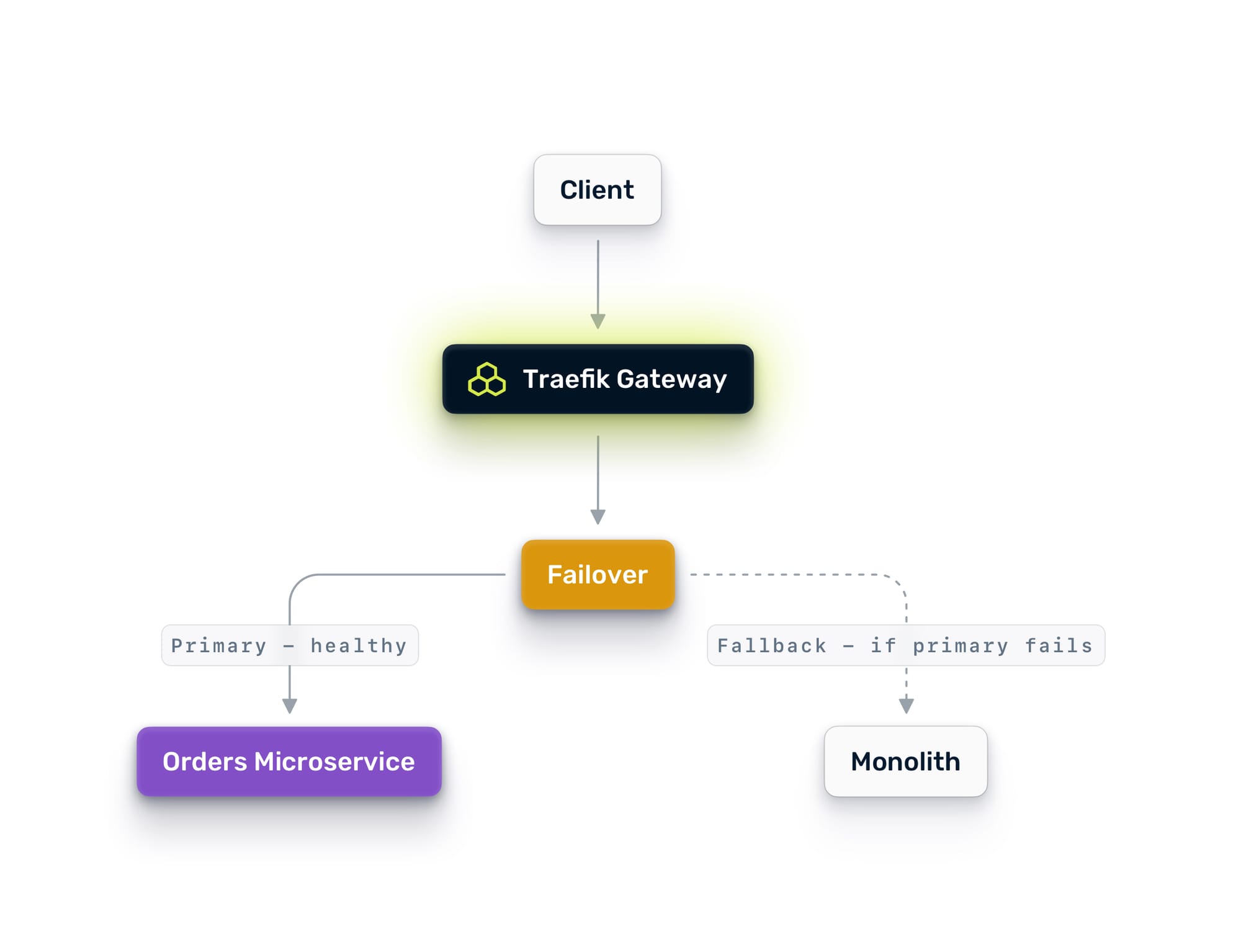
Only decommission the old path when the team is confident, and the data confirms it.
Phase 4: Repeat
Pick the next service. The process is the same: mirror, A/B test, shift, cut over. Each extraction gets easier because the patterns are established, the tooling is in place, and the team has done it before.
The Multi-Cluster Architecture
What makes this work on Nutanix is the multi-cluster topology. The parent Traefik Hub instance on NKP is the single entry point for all external traffic. It connects to child instances running on:
- NKP workload clusters hosting your containerized microservices
- AHV VMs hosting your monolith and any services that have not yet been containerized
- Additional NKP clusters if you run dedicated clusters for different teams or environments
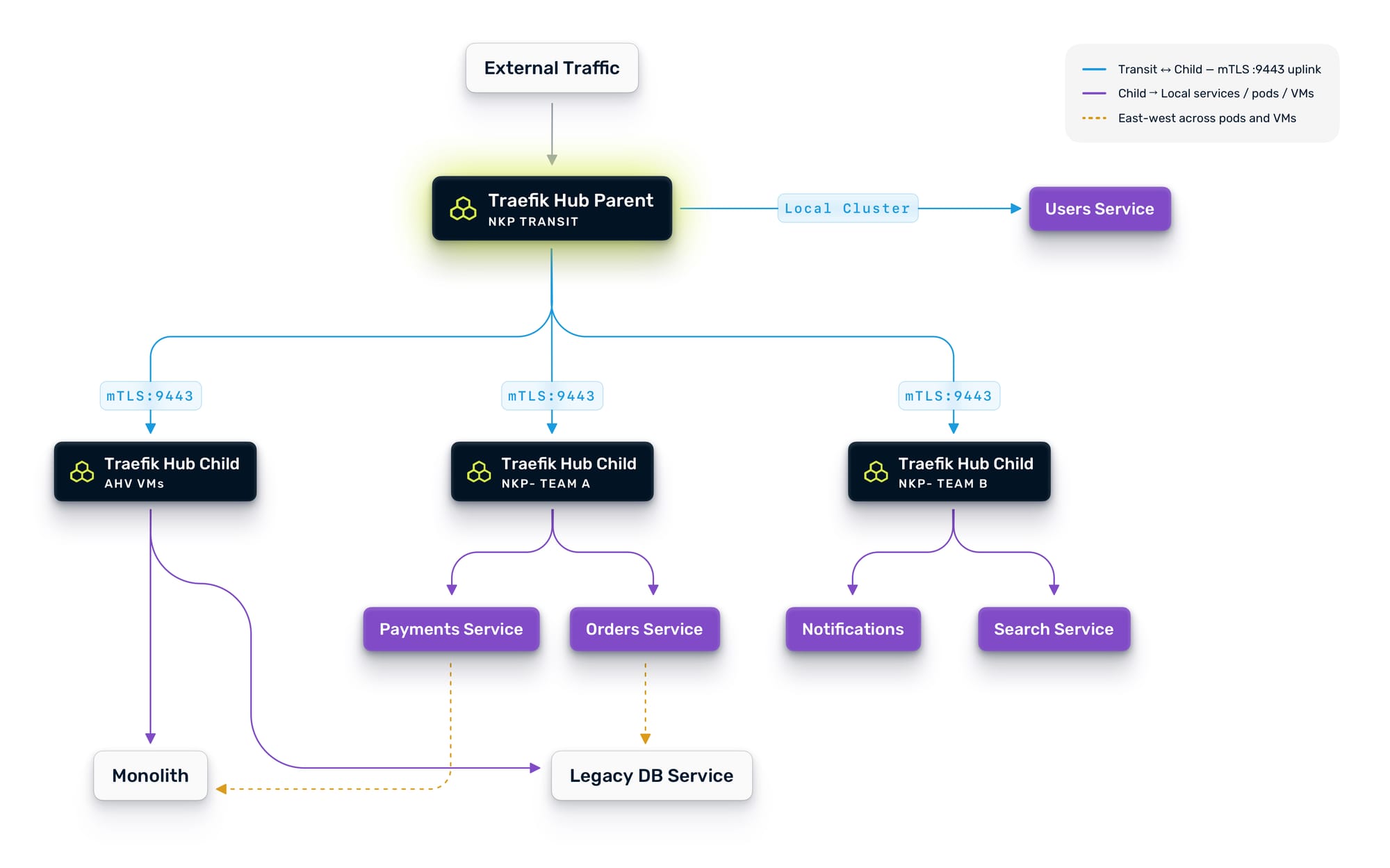
The parent automatically discovers workloads advertised by each child. When a new service comes online in any child cluster, the parent sees it and can route to it immediately. This works across Kubernetes and VMs transparently because the multi-cluster provider is infrastructure-agnostic. It just needs HTTP connectivity.
This also means your Day 2 operations benefit from the same architecture. Need to spin up a new NKP cluster for a team? Add it as a child, and the parent can route to it. Need to run a canary deployment across clusters? Use weighted routing on the parent to split traffic between the old and new clusters. Need high availability? Configure failover services so traffic shifts automatically when a cluster goes down.
What You Get at the End
By the end of this process, you have:
- A unified gateway that manages traffic across VMs and containers from a single control plane
- Defense in depth: L7 application security from Traefik Hub and L3/4 microsegmentation from Nutanix Flow, working in concert
- Centralized authentication that does not require the monolith to change
- End-to-end observability across every service, regardless of where it runs
- A proven, repeatable process for extracting services safely
- Infrastructure that supports the next evolution, whether that is AI workloads, edge deployments, or API management
The monolith does not disappear overnight. It should not. Some parts of it will run for years, and that is fine. The point is that you can extract what needs to move, at the pace that makes sense for your teams, with the confidence that every step is reversible.
Traffic control is migration control. And on Nutanix with Traefik Hub, you have all the control you need.
Additional Resources
In This Article