The Governance Playbook for NVIDIA OpenShell™: Govern at the Door, Not in the Sandbox
Containment Is Handled. Governance Is the Next Decision.
In Harnesses and Sandboxes Will Keep Multiplying. Your Governance Should Not, we argued that governance belongs at the one place every agent shares: the way out. This playbook goes deep on one sandbox runtime, NVIDIA OpenShell™, step by step, from the first agent to production.
With the NVIDIA Open Agent Safety Platform, NVIDIA made the NVIDIA OpenShell secure runtime the boundary around each agent: software that "traces all actions and enforces policy" outside the model and the agent harness. OpenShell 0.1.4 runs that runtime on Kubernetes, with a driver, a Helm chart, stock images, and a gateway that holds each agent's credentials and renews them.
Inside an OpenShell sandbox, Landlock, a separate user, and a network namespace keep the agent's process in its place. Its only way out is a supervisor that checks the binary, the host, and the address before anything leaves.
That answers the first question a platform team asks: what can this agent's process touch?
The next four are the ones every harness and sandbox raises as soon as agents run, and OpenShell adds a fifth:
- Reach. Which models, tools, and APIs may this agent use, for the task it was given? A code-review agent should not issue refunds.
- Credentials. Where do the model and API keys live, and who can read them?
- Cost. What may this agent spend on models, and what stops a runaway loop?
- Approval. On whose authority did the agent act, and where is that recorded?
- Operation. Who may create sandboxes, open shells in them, and upload files into them?
The OpenShell runtime is built to be extended, and it already has the hooks these answers need: a reverse-proxy mode for a trusted front door, provider profiles that hold credentials outside the sandbox, and an egress policy that can name a single destination. This playbook uses each hook as documented and puts Traefik Hub behind it. The six steps answer reach, credentials, and operation, and record every call; "Before You Go to Production" adds dollar limits for cost and delegated identity for approval.
Govern at the Door, Not in the Sandbox
There are two places to put the answers.
Inside each sandbox. Each agent's allowed destinations go into its sandbox policy, provider keys go through each OpenShell gateway, and each gateway signs in its own operators. This works for a pilot, and it grows with every sandbox you create. Each new agent means another policy. Every key rotation touches every gateway. A second runtime or platform means writing it all again in another format.
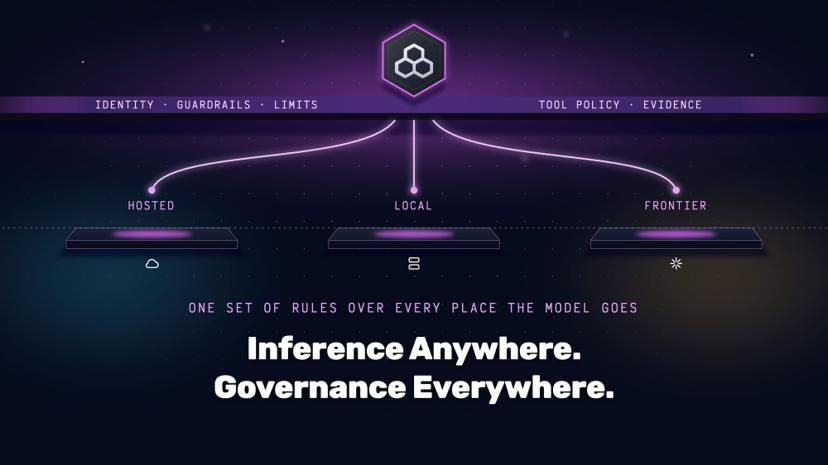
At the door. One gateway is the sandbox's only destination. Each agent carries a short-lived identity that names its task, and every call is decided there, from that identity. The number of policies follows the number of tasks, not the number of sandboxes: a thousand code-review sandboxes share one code-review policy. Provider keys live in one place. Because the policies read claims from a token rather than facts about the runtime, they keep working when the runtime or the platform underneath changes.
Govern at the door. The rest of this playbook shows how.
Count your policies by task, not by sandbox. That is the difference between a pilot and a platform.
The Architecture: Two Doors, One Hub
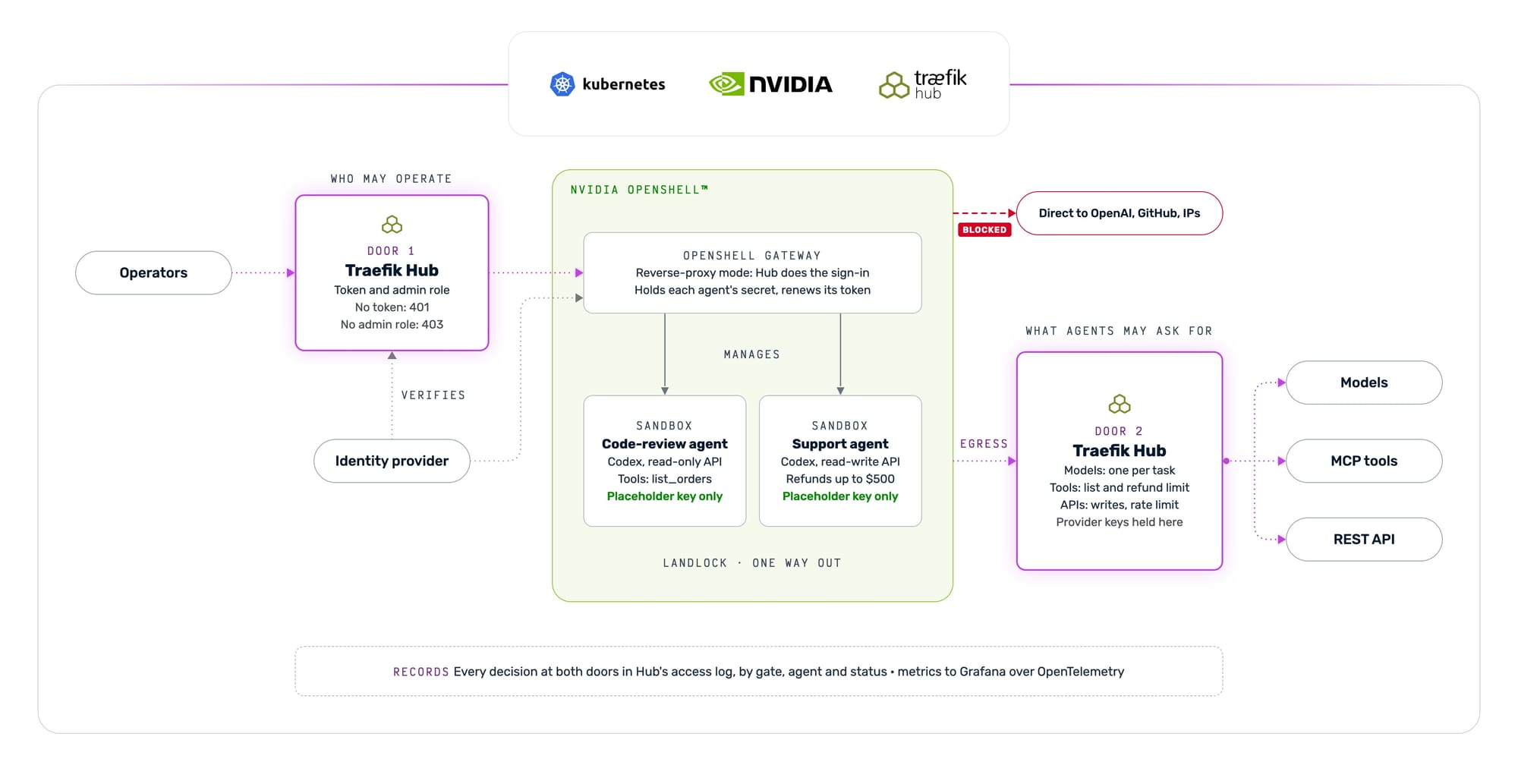
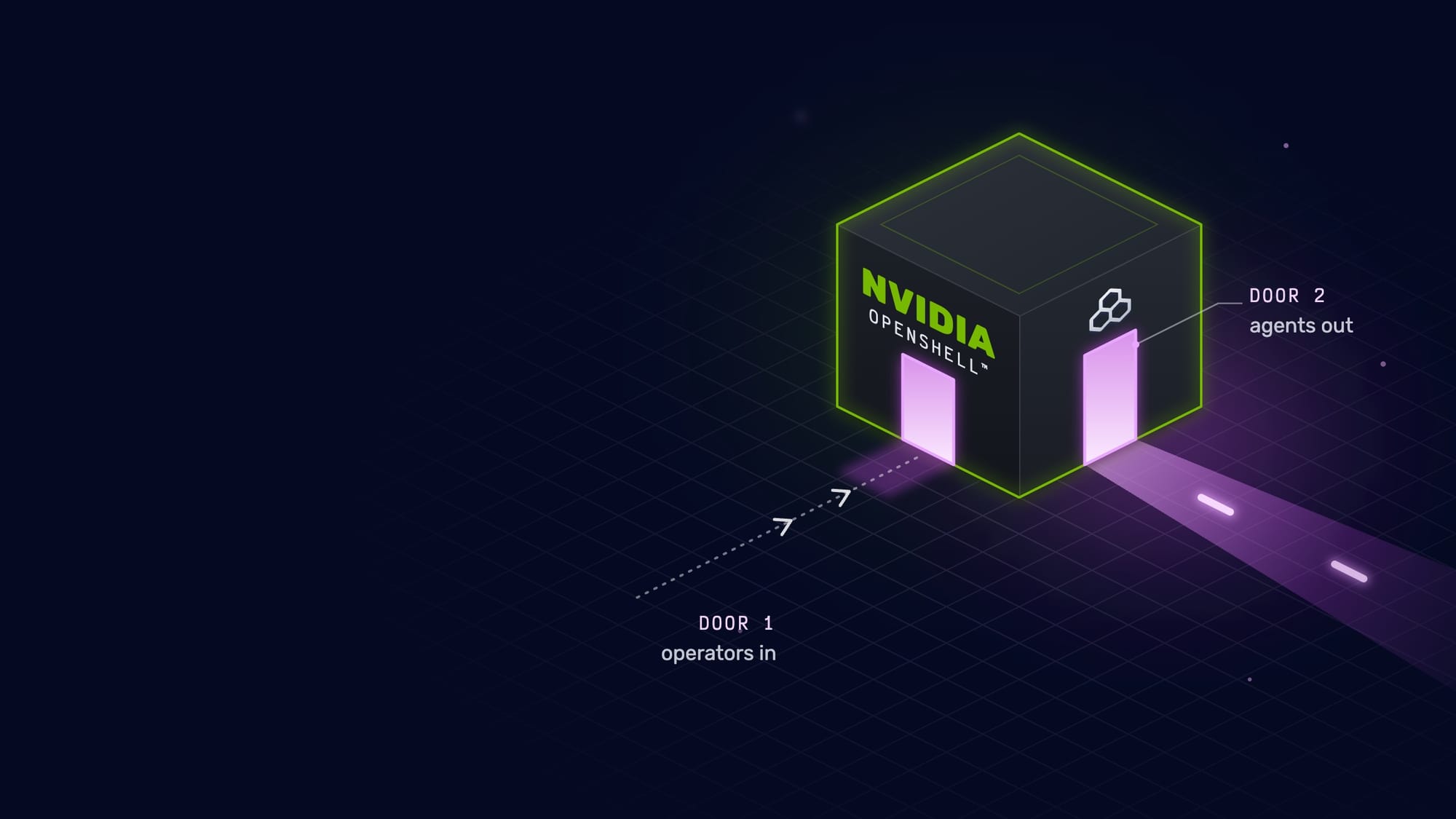
An OpenShell deployment has two doors. Door 1 is the way in: people operating OpenShell through its CLI and API. Door 2 is the way out: agents reaching models, MCP tools, and APIs. Traefik Hub stands at both. Door 2 is the one door every agent shares; Door 1 is the one OpenShell adds.
The examples use two unmodified Codex agents in sandboxes built from NVIDIA's community base image: a code-review agent and a customer-support agent. Same image, same configuration. The only difference between them is the identity each sandbox carries.
The Playbook
Six steps. Each uses OpenShell and Traefik Hub features as documented, and none changes NVIDIA's images.
Step 1: Give Every Agent an Identity, Not a Key
The sandbox should never hold a provider key. It should not even hold its own token.
Register one confidential client per agent with your identity provider, and have the client fix the claims its tokens carry. These claims are the whole policy input for the gates in Step 5:
| Agent | task | allowed_tools | max_refund | api_access |
|---|---|---|---|---|
| agent-review | code-review | list_orders | 0 | read |
| agent-support | customer-support | list_orders, refund_order | 500 | read-write |
Then give the client secret to OpenShell, not to the sandbox. An OpenShell provider profile makes the OpenShell gateway hold the secret, fetch a short-lived token with client credentials, and renew it before it expires:
OPENSHELL · provider profile · the gateway holds the secret and renews the token
# openshell/agent-identity.yaml (excerpt)
credentials:
  - name: agent_token
    env_vars: [OPENAI_API_KEY]
    auth_style: bearer
    refresh:
      strategy: oauth2_client_credentials
      token_url: https://keycloak.keycloak.svc.cluster.local:8443/realms/agents/protocol/openid-connect/token
      refresh_before: "120s"
      max_lifetime: "300s"
The agent reads OPENAI_API_KEY as it always does. Inside the sandbox, that variable holds only a placeholder (openshell:resolv…), which the OpenShell supervisor swaps for the current token on requests to Hub. Provider keys stay in a Kubernetes Secret that only Hub reads, and Hub adds them on the way out.
What this cannot do. The token proves which agent is calling and for which task. It does not carry state, such as how much this agent has already refunded today. That needs a decision point (see "Before You Go to Production").
Step 2: Make Hub the Only Way Out
Set one gateway-wide OpenShell policy that names Hub's in-cluster hosts, pins each to its cluster address, and lists the only binaries allowed to connect. Make Landlock a hard requirement. Everything else, from any process, is denied:
OPENSHELL · gateway-wide policy · Hub is the only destination
# openshell/openshell-policy.yaml (excerpt)
network_policies:
  hub:
    endpoints:
      - host: agents.traefik.svc.cluster.local
        port: 443
        protocol: rest
        allowed_ips: ["@AGENTS_IP@/32"]
      - host: mcp.traefik.svc.cluster.local
        port: 443
        protocol: mcp
        allowed_ips: ["@MCP_IP@/32"]
Give Hub two names, because OpenShell assigns one protocol per host: REST for models and APIs, MCP for tools. With this policy in force, a direct call from the sandbox to OpenAI, GitHub, a bare IP, or a backend fails.
The OpenShell supervisor terminates the agent's TLS to inspect each request, then opens its own connection to Hub, so it must trust Hub's certificate. OpenShell 0.1.4 takes a CA setting for a corporate proxy. For a destination like Hub, use a Kubernetes MutatingAdmissionPolicy to mount a trust bundle from trust-manager over the supervisor's CA file as each supervisor pod starts. The image stays stock.
What this cannot do. The policy governs the agent's process. In OpenShell 0.1.4, the supervisor pod itself has an allow-all egress NetworkPolicy. Step 4 closes that.
Step 3: Put Operators Behind the Same Door
The OpenShell API is administrative access to every agent: it creates sandboxes, opens shells in them, and uploads files into them. Govern it like any other privileged API.
Run OpenShell in reverse-proxy mode, which hands sign-in to a trusted proxy in front of its gateway, and make Hub that proxy. Operators keep using the OpenShell CLI, whose OIDC flow signs them in at your identity provider. Hub checks the token and role on every OpenShell API call except the public health check:
TRAEFIK HUB · operator door · admins only, by name in the log
# kustomize/05-identity/operators.yaml (excerpt)
claims: Contains(`aud`, `openshell-cli`) && Contains(`realm_access.roles`, `openshell-admin`)
forwardHeaders:
  X-Operator-User: preferred_username   # OpenShell sees no user in this mode; Hub's access log keeps it
A call with no token gets 401. A signed-in user without the admin role gets 403. Neither reaches OpenShell. An admin works as usual, and Hub's access log records the operator's name on every call. Restrict the operator door's public address to your source ranges, and turn off the listener's read timeout so long-lived OpenShell exec and upload streams stay open.
What this cannot do. In reverse-proxy mode, OpenShell sees every operator as one unauthenticated admin, so Hub is where each operator is checked and named, and Step 4 makes it the only way in. Hub also forwards the token, which the OpenShell OIDC check could verify as well; that combination is not covered here.
Step 4: Close Every Other Door
Reverse-proxy mode comes with one condition. The OpenShell documentation makes the proxy responsible for authenticating callers, and warns that a gateway accepting unauthenticated calls must never face a shared or public network. Make the proxy the only way to reach the gateway, and enforce that with two NetworkPolicies. Admit only Hub and the OpenShell namespace to the OpenShell gateway, and only Hub to the backends the agents call. A pod in any other namespace then times out on both.
Then narrow the supervisor's own egress. Standard NetworkPolicies are additive, so they cannot narrow the allow-all policy OpenShell 0.1.4 gives each supervisor. On Cilium, a deny policy can; the companion repository includes one. On another CNI, use its equivalent.
What this cannot do. NetworkPolicy does not filter a node's own traffic. Nodes, host-network pods, and anyone with rights to port-forward or create pods in the admitted namespaces can still go around the door. Close those with RBAC and admission control.
Step 5: Write Policy by Task, at Three Gates
Behind Door 2, every call passes one of three gates: models, MCP tools, or the REST API behind them. This is Traefik's Triple Gate Pattern. Each gate verifies the agent's token, removes any identity headers the sandbox tries to set, and decides from the token's claims.
Tools. An agent sees and calls only the tools its token lists, and refunds up to its token's limit on each call:
TRAEFIK HUB · MCP gate · tools and refund limit from the token
# kustomize/06-gates/agents.yaml (excerpt): the MCP gate's call rules
- { action: allow, match: "Equals(`mcp.method`,`tools/call`) && Contains(`jwt.allowed_tools`, `${mcp.params.name}`) && !Equals(`mcp.params.name`,`refund_order`)" }
- { action: allow, match: "Equals(`mcp.method`,`tools/call`) && Equals(`mcp.params.name`,`refund_order`) && Contains(`jwt.allowed_tools`, `refund_order`) && Lte(`mcp.params.arguments.amount`, `${jwt.max_refund}`)" }
Ask the support agent to refund $20 on order A-1002, then $600 on order A-1003. Order A-1003 is worth $1,250, so nothing in the order stops a $600 refund. The agent's token does. The $20 refund goes through. The $600 refund gets Forbidden before it reaches the database, and reading the refunds table back through the API gate shows only the $20. The code-review agent's tool list holds list_orders and nothing else, and a direct call to the refund tool or the database's execute_sql tool gets 403.
API. The same data, served as a REST API, follows the same token. Any agent may read; writing needs api_access=read-write. A write from the code-review agent gets 403, even with a forged X-Agent-Id header naming the support agent, and Hub logs the call under the agent named in the token. Each agent gets ten calls a minute; beyond that, Hub answers 429.
Models. Any agent may use the smaller model; the larger one is reserved for code review and schema migration, and each agent's model list shows only what its task may use. A support agent that asks for the larger model gets 403, and so does a prompt carrying a string shaped like an OpenAI key. Neither reaches the provider. On allowed calls, Hub removes the agent's identity before the request leaves, so the provider never learns which agent called.
None of these rules mentions OpenShell, a sandbox name, or a pod. They read task, allowed_tools, max_refund, and api_access from a token. A new sandbox for an existing task needs no new rule, and the same rules govern the same agents on another runtime.
What this cannot do. The refund limit applies per call; a total per order or per day needs state, in the backend or a decision point. The rate limit counts per Hub replica; with several replicas, use Hub's distributed rate limit. The prompt guard here matches key-shaped strings, not unsafe content.
Step 6: Record Every Decision
Send Hub's access log as JSON and its metrics over OpenTelemetry. The access log holds every call at both doors, by gate, agent, and status, with the identity Hub took from the token. The metrics give calls per gate and status, and model tokens per agent, labeled from the token even though Hub removes the identity before calling the provider.
OpenShell keeps its own record of process and network decisions. Together, the two records answer which process does what, and which agent, doing which task, may make each call.
Where OpenShell Ends and Hub Begins
Both sit between the agent and the network, both can hold credentials, and both can say no. Each answers a different question.
| Concern | NVIDIA OpenShell | Traefik Hub |
|---|---|---|
| Processes and files | Landlock, a separate user | Not involved |
| Network egress from the sandbox | Supervisor proxy, per binary and host | The only destination |
| The agent's credential | Holds the secret, renews the token | Verifies the token |
| Provider keys | None in this design | Holds them, adds them on the way out |
| Which model, tool, or API call a task may make | Passes the call to Hub | The three gates |
| The operator's identity | Trusts Hub, in reverse-proxy mode | Verifies the token and role |
| The record | Process and network decisions | Gate, agent, and status of each call |
Where both could do a job, choose one. Leave OpenShell inference routing unused, so model policy lives in one place. Have OpenShell inject the agent's identity rather than provider keys, so even the token behind the placeholder works only at Hub and lives five minutes. Let OpenShell check MCP protocol versions and methods, and Hub check which tool, with which arguments, for which task.
Before You Go to Production
The companion repository runs as is, on a cluster of its own, with demo parts you replace before production:
- Identity. Replace the development identity provider and its test users with yours. Have it issue the task claims; Hub only verifies them.
- Certificates. Point cert-manager at your own issuer instead of the demo CA.
- Observability. Turn off anonymous viewing in Grafana.
Then extend the gates with capabilities Hub already ships:
- External decisions over AuthZEN, when a decision needs data the token does not carry, such as how much has already been refunded today.
- Delegated identity with Hub's OAuth token exchange (RFC 8693), so each token names the user who delegated the task as well as the agent, and the record shows on whose authority every call was made.
- Content safety with NVIDIA NemoGuard models: Hub's LLM Guard checks prompts with an external guard model, and Hub's documentation covers NVIDIA NIM™ microservices.
- Dollar limits per agent on model calls, priced per model, so a looping agent stops at its budget.
- A tamper-evident record, with Hub's Transparency Logs adding every access log entry to a Merkle tree with signed checkpoints.
Where to Start
You need a Kubernetes 1.36 cluster of your own, nodes running Linux 6.2 or later with Landlock active, a CNI that enforces NetworkPolicy, a Traefik Hub license, and a model provider key. The hands-on guide pins NVIDIA OpenShell 0.1.4 and Traefik Hub v3.21.2, and every image is an official upstream image: you build nothing.
The guide walks through the full deployment, with the commands to run and the output to expect at each step. The companion repository holds everything the guide applies: kustomize overlays, Helm values, the OpenShell policy and identity profile, the agent's configuration, and the scripts that check each step. Both are available on request: request a trial, and our team will review your request and give you access to the guide and the repository.
OpenShell is built to be extended to third-party compute platforms. If you are building the OpenShell runtime into your own platform or offering, we would like to work with you on making this door part of it.
The harness drives the agent. OpenShell contains it. Traefik Hub decides what it may do on the way out, and who may operate it. Decide where governance lives before you scale, and put it at the door.
Happy building.
NVIDIA, NVIDIA OpenShell, and NVIDIA NIM are trademarks and/or registered trademarks of NVIDIA Corporation in the U.S. and other countries. Traefik and Traefik Hub are trademarks or registered trademarks of Traefik Labs. Kubernetes, Helm, Cilium, and OpenTelemetry are trademarks or registered trademarks of The Linux Foundation. Linux® is the registered trademark of Linus Torvalds in the U.S. and other countries. OpenAI, Codex, Grafana, and GitHub are trademarks or registered trademarks of their respective owners. Other company and product names may be trademarks of the respective companies with which they are associated.