From Regex to GPU: Building a Multi-Vendor AI Safety Pipeline with NVIDIA, IBM, Microsoft, and Custom Pattern Matching


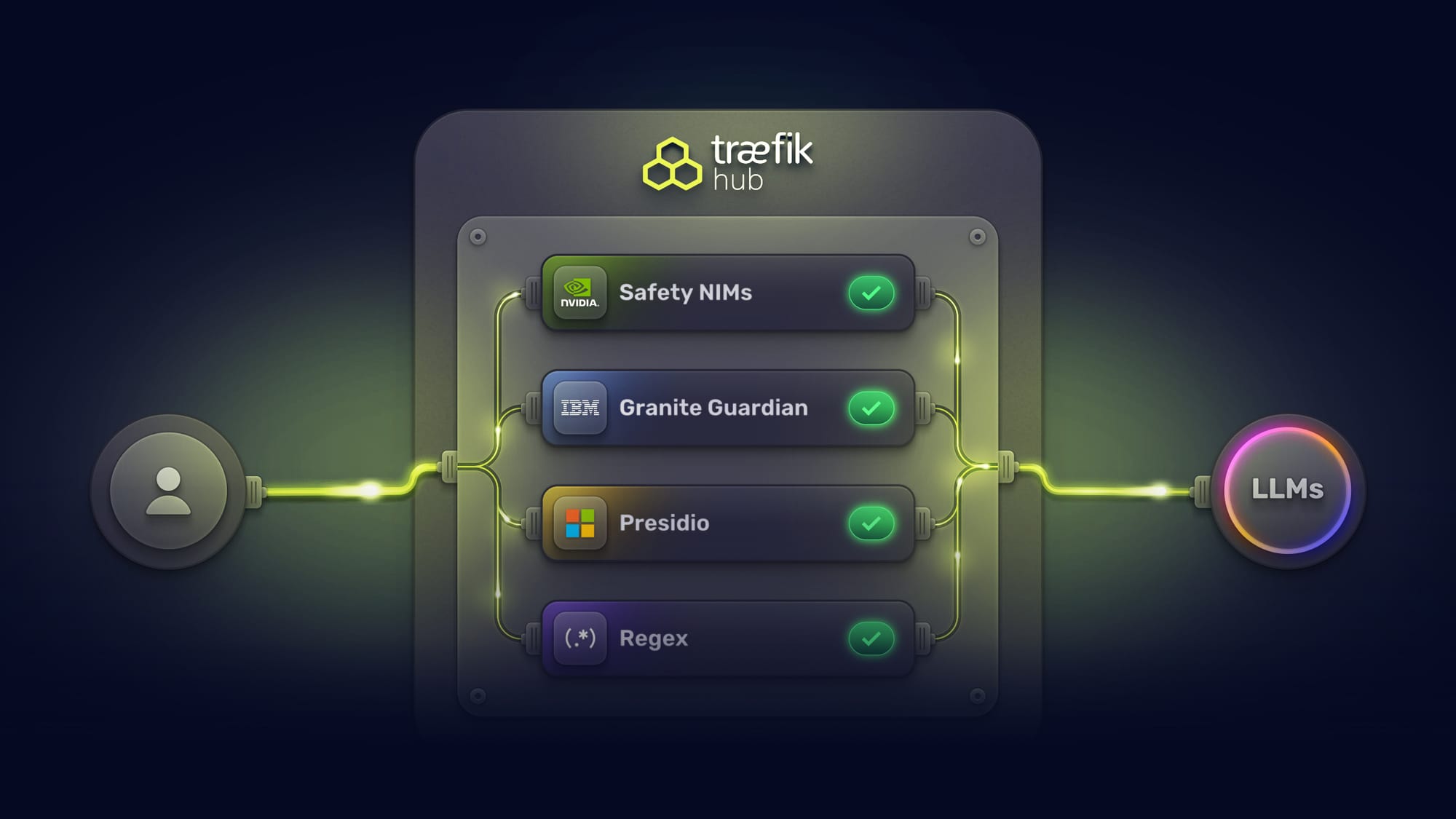
AI runtime safety has always been about layers. No single guard catches everything. Deterministic pattern matching is fast, but it can't understand context. NLP-based entity detection catches structured PII but misses semantic threats. GPU-accelerated models understand nuance but add latency and cost. The right approach has always been defense-in-depth: multiple guards, different detection methods, complementary coverage.
The problem is that defense-in-depth has historically meant stacking latency. Three guards running in series can add several seconds of enforcement overhead per request. In production, that's a non-starter. Organizations end up choosing between thorough protection and acceptable performance, deploying one or two guards instead of the four or five they'd actually want.
Traefik Hub v3.20 changes this. The AI Gateway now supports a composable, multi-vendor safety pipeline, where organizations can choose from multiple guardrail providers, combine them based on their requirements, and run them all in parallel. Total enforcement time equals the slowest guard, not the sum. And when a guard blocks a request, the response is structured so agents and middleware chains can handle it gracefully instead of crashing.

This post walks through the architecture, configuration, and practical considerations for building a multi-vendor safety pipeline with Traefik Hub.
The Pipeline: Four Tiers from Deterministic Speed to Semantic Intelligence
The composable safety pipeline spans four tiers. Each tier serves a different purpose, uses a different detection approach, and has different performance and infrastructure characteristics. Organizations deploy the tiers they need based on their threat model, latency budget, and infrastructure.
Tier 1: Regex Guard (Custom Pattern Matching)
Regex Guard is a framework for organizations to write their own content guards. It's not a pre-built guard with fixed rules. Teams define the patterns they want to catch, the fields they want to scan, and whether to block or mask matched content.
Here's how it works: the Regex Guard implements a rule-based pattern matching engine integrated into the Content Guard middleware. Each rule specifies one or more JSONQuery expressions that locate target fields in structured payloads, one or more regex patterns to match against, and an action (block or mask) to take on match.
Here's a practical configuration that blocks prompt injection patterns in chat messages while masking credit card numbers in customer data:
apiVersion: traefik.io/v1alpha1
kind: Middleware
metadata:
  name: regex-guard
  namespace: apps
spec:
  plugin:
    content-guard:
      engine:
        regex: {}

      request:
        # Block prompt injection attempts in chat messages
          - jsonQueries:
              - ".messages[].content"
              - ".prompt"
            block: true
            reason: "Potential prompt injection detected"
            entities:
              - "(?i)ignore.*(previous|above|prior).*(instructions|prompt)"
              - "(?i)you are now.*(new|different|unrestricted)"

        # Mask credit card numbers in customer data
        - jsonQueries:
            - ".customer.payment"
            - ".billing.card_number"
          mask:
            char: "*"
            unmaskFromLeft: 0
            unmaskFromRight: 4
          entities:
            - "\d{4}[-\s]?\d{4}[-\s]?\d{4}[-\s]?\d{4}"

        # Mask US Social Security numbers
        - jsonQueries:
            - ".user.ssn"
            - ".applicant.social_security"
          mask:
            char: "*"
            unmaskFromLeft: 0
            unmaskFromRight: 4
          entities:
            - "\\d{3}-\\d{2}-\\d{4}"

      response:
        # Mask internal IP addresses in error responses
        - jsonQueries:
            - ".error_detail"
            - ".debug_info"
          mask:
            char: "X"
            unmaskFromLeft: 0
            unmaskFromRight: 0
          entities:
            - "192\\.168\\.[0-9]{1,3}\\.[0-9]{1,3}"
            - "10\\.[0-9]{1,3}\\.[0-9]{1,3}\\.[0-9]{1,3}"
A few things to note about the configuration:
JSONQuery field targeting lets you scope rules to specific fields rather than scanning entire payloads. .messages[].content targets the content field in a chat completion request. .customer.payment targets a specific nested field.
Block vs. mask serves different purposes. Blocking rejects the request entirely. Masking redacts the matched content in-place and lets the request continue. Use blocking for threats (prompt injection, system prompt leakage). Use masking for PII (credit cards, SSNs, phone numbers) where you want the request to proceed with sensitive data redacted.
Bidirectional rules apply to both requests and responses independently. Request-side rules catch threats before they reach the LLM. Response-side rules prevent information leakage (internal IPs, database connection strings, infrastructure identifiers) in the LLM's output.
Performance: Regex Guard runs entirely in-process with zero external dependencies. Latency is sub-millisecond for typical payloads. There are no network round-trips, no GPU requirements, and no probabilistic variance. The same input always produces the same output.
The cost argument is straightforward. Catching a credit card number or Social Security number doesn't require semantic understanding. These are well-defined patterns with well-known formats. Running them through a GPU-accelerated AI model adds latency and cost with no improvement in detection accuracy for these patterns. Regex Guard handles them at a fraction of the cost and an order of magnitude faster.
Tier 2: Content Guard (Microsoft Presidio)
Content Guard provides PII detection and masking powered by Microsoft's Presidio analyzer. Where Regex Guard relies on patterns you define, Presidio uses statistical NLP-based entity recognition with a library of built-in entity types: email addresses, phone numbers, medical record IDs, credit card numbers, and more.
Presidio requires an external analyzer instance. You deploy the Presidio service and configure Content Guard to point at it. The middleware sends the content to Presidio for analysis, receives entity detection results, and applies blocking or masking based on the matches.
Content Guard supports custom entity patterns through Presidio's custom analyzer endpoints, allowing organizations to extend beyond the built-in entity types for formats specific to their business.
The tradeoff vs. Regex Guard: Presidio's NLP-based detection can catch entities that don't follow strict patterns (misspelled names, partial phone numbers, context-dependent PII). But it requires an external service, adds network latency, and introduces a dependency. For well-defined patterns, Regex Guard is faster. For fuzzy or context-dependent PII, Presidio is more thorough. In a composable pipeline, you can run both.
Tier 3: LLM Guard with NVIDIA NIMs
NVIDIA NIM (NVIDIA Inference Microservices) integration provides GPU-accelerated content safety through three specialized microservices:
Topic Control NIM enforces conversation boundaries. It takes guideline-based prompts that define allowed and prohibited topics, and blocks requests that fall outside the defined scope.
Content Safety NIM detects harmful content across 22+ safety categories, including violence, hate speech, and privacy violations. Analyzes both user requests and AI responses in real-time.
Jailbreak Detection NIM identifies attempts to bypass AI system restrictions through prompt manipulation.
Each NIM requires a dedicated GPU with 24GB+ memory. Minimum processing latency per NIM ranges from 30ms (jailbreak detection) to 200ms (content safety). When running all three sequentially, total minimum latency is 180-350ms. With parallel execution, total latency equals only the slowest NIM.
This is where GPU-accelerated semantic intelligence earns its latency cost. NVIDIA NIMs catch threats that pattern matching and NLP-based detection cannot: nuanced prompt injection attempts that don't use obvious keywords, subtle harmful content that requires contextual understanding, and off-topic drift that a regex rule would need hundreds of patterns to approximate.
Tier 4: LLM Guard with IBM Granite Guardian
IBM's Granite Guardian 3.3 (8B parameter) is an open-source safety model that provides capabilities other guard providers don't yet offer: hallucination detection and RAG quality assessment.
Granite Guardian uses a prompt-template approach. Each safety task (harm, jailbreak, topic control, hallucination) is triggered by a specific system prompt. The model responds with a structured <score> yes </score> or <score> no </score> evaluation, which the LLM Guard middleware evaluates with block conditions.
Here's the hallucination detection configuration, which is response-only and uses request history for context:
apiVersion: traefik.io/v1alpha1
kind: Middleware
metadata:
  name: granite-hallucination-detection
  namespace: apps
spec:
  plugin:
    chat-completion-llm-guard:
      endpoint: http://granite-guardian.apps.svc.cluster.local:8000/v1/chat/completions
      model: ibm-granite/granite-guardian-3.3-8b
      params:
        temperature: 0
        maxTokens: 50
      response:
        systemPrompt: "hallucination"
        useRequestHistory: true
        blockConditions:
          - reason: hallucination_detected
            condition: Contains("yes")
And here's harm detection, which scans both requests and responses:
apiVersion: traefik.io/v1alpha1
kind: Middleware
metadata:
  name: granite-harm-detection
  namespace: apps
spec:
  plugin:
    chat-completion-llm-guard:
      endpoint: http://granite-guardian.apps.svc.cluster.local:8000/v1/chat/completions
      model: ibm-granite/granite-guardian-3.3-8b
      params:
        temperature: 0
        maxTokens: 50
      request:
        systemPrompt: "harm"
        blockConditions:
          - reason: harmful_content_detected
            condition: Contains("yes")
      response:
        systemPrompt: "harm"
        useRequestHistory: true
        blockConditions:
          - reason: harmful_response
            condition: Contains("yes")
Granite Guardian is deployed via vLLM and requires one GPU with approximately 16GB memory (FP16) or 8GB (8-bit quantization). The temperature: 0 parameter is required for reliable classification.
The unique value of Granite Guardian in the composable pipeline is hallucination detection and RAG quality assessment. NVIDIA NIMs don't yet offer hallucination detection. Presidio and Regex Guard are structurally unable to detect hallucinations (they match patterns, not factual accuracy). If your application uses retrieval-augmented generation and you need to verify that the model's response is grounded in the retrieved context, Granite Guardian is currently the only guard tier in the pipeline that addresses this.
Parallel Guard Execution: Defense-in-Depth Without the Latency Tax
With four tiers available, the question becomes: can you run them all without making every request unacceptably slow?
The answer is parallel guard execution. Instead of running guards in series (where total latency equals the sum), Traefik Hub runs all guards simultaneously. Total enforcement time equals only the slowest guard.
The parallel-llm-guard middleware orchestrates this. It spawns all configured guards as concurrent Go routines, collects results as they complete, and makes a pass/fail decision. Every guard blocks equally; there is no critical/optional distinction. If any guard blocks, the request is rejected with a 403, and all other guards are immediately cancelled. If any guard errors, the request fails with a 500, and all others are cancelled.
Each guard in the guards array wraps one of four guard types:
chat-completion-llm-guardchat-completion-llm-guard-customllm-guardllm-guard-custom
apiVersion: traefik.io/v1alpha1
kind: Middleware
metadata:
  name: parallel-safety-pipeline
  namespace: ai-services
spec:
  plugin:
    parallel-llm-guard:
      guards:
        - chat-completion-llm-guard:
            endpoint: http://granite-guardian.apps.svc.cluster.local:8000/v1/chat/completions
            model: ibm-granite/granite-guardian-3.3-8b
            clientConfig:
              timeoutSeconds: 5
            params:
              temperature: 0
              maxTokens: 50
            request:
              systemPrompt: "harm"
              blockConditions:
                - reason: harmful_content
                  condition: Contains("yes")

        - chat-completion-llm-guard:
            endpoint: http://granite-guardian.apps.svc.cluster.local:8000/v1/chat/completions
            model: ibm-granite/granite-guardian-3.3-8b
            clientConfig:
              timeoutSeconds: 5
            params:
              temperature: 0
              maxTokens: 50
            request:
              systemPrompt: "jailbreak"
              blockConditions:
                - reason: jailbreak_attempt
                  condition: Contains("yes")

        - llm-guard:
            endpoint: http://nvidia-content-safety.apps.svc.cluster.local:8000
            clientConfig:
              timeoutSeconds: 5
            request:
              blockConditions:
                - reason: unsafe_content
                  condition: Contains("UNSAFE")
In this configuration, all guards run concurrently. Total enforcement time equals the slowest guard, not the sum. If one guard completes and blocks the request, all other guards are immediately cancelled, as there is no need to spend tokens (and GPU cycles) on finishing processing guard executions on a request that's already been rejected by a faster check.
Agent-Aware Enforcement: Graceful Error Handling
A composable safety pipeline that catches threats is only half the story. The other half is what happens when a guard blocks a request.
Traditional gateways return an HTTP 403 Forbidden with a plain-text error message. This works for simple request-response APIs. It doesn't work for autonomous agents or agentic workflows.
When an agent executes a multi-step workflow and one step triggers a guardrail, an HTTP 403 breaks the agent's control flow. The agent can't distinguish between "the guardrail blocked this specific request" and "something is fundamentally wrong with the system." Most agent frameworks treat non-2xx responses as errors that require human intervention or task failure. A single guardrail block can crash an entire multi-step workflow.
Traefik Hub v3.20 introduces the onDenyResponse feature. When configured, guardrail blocks return a custom HTTP status code and message instead of the default 403. This is configured per block condition, so different denial reasons can return different responses:
apiVersion: traefik.io/v1alpha1
kind: Middleware
metadata:
  name: llm-guard-with-graceful-errors
spec:
  plugin:
    chat-completion-llm-guard:
      endpoint: http://granite-guardian.apps.svc.cluster.local:8000/v1/chat/completions
      model: ibm-granite/granite-guardian-3.3-8b
      params:
        temperature: 0
        maxTokens: 50
      request:
        systemPrompt: "harm"
        blockConditions:
          - reason: harmful_content
            condition: Contains("yes")
            onDenyResponse:
              statusCode: 200
              message: 'This request was blocked by security policies. Please reformulate your request.'
An agent receiving an HTTP 200 with a refusal message can parse it as a valid turn in the conversation, understand that the request was refused (not that the system failed), and decide what to do next: retry with modified input, skip this step, or escalate to a human.
This also keeps middleware chains intact. Without onDenyResponse, a 403 from an upstream guardrail could potentially break downstream custom plugins ( eg., custom response handlers, loggers) that expect structured JSON and were not created with graceful error handling in mind. With it, the entire chain processes normally.
Existing deployments continue returning HTTP 403 by default. Each block condition can independently define its own onDenyResponse with a custom status code and message template.
Operational Controls: Resilience and Cost
A safety pipeline, even one that's composable and parallel, isn't sufficient for production on its own. Organizations also need their AI to stay up when providers go down and stay within budget. Traefik Hub v3.20 adds both.
Failover Router
The Failover Router uses nested TraefikService resources to build a failover chain across LLM providers. When a primary backend responds with a configured error status code (e.g., 429 rate limit, 500-504 server errors), the request is automatically replayed to the fallback service. Each backend gets its own chat-completion middleware for independent model selection, API keys, and metrics.
# Primary backend: OpenAI GPT-4o
apiVersion: traefik.io/v1alpha1
kind: TraefikService
metadata:
  name: openai-primary
  namespace: ai-services
spec:
  failover:
    service:
      name: openai-gpt4o
      middlewares:
        - name: openai-chat-completion
    fallback:
      name: anthropic-fallback
    errors:
      status:
        - "429"
        - "500-504"
---
# Secondary backend: Anthropic Claude
apiVersion: traefik.io/v1alpha1
kind: TraefikService
metadata:
  name: anthropic-fallback
  namespace: ai-services
spec:
  failover:
    service:
      name: anthropic-claude
      middlewares:
        - name: anthropic-chat-completion
    fallback:
      name: openai-mini-budget
    errors:
      status:
        - "429"
        - "500-504"
Each chat-completion middleware configures the provider-specific details (model name, API key secret, parameters) independently. This means each backend in the failover chain can use a different provider, model, and set of credentials. The failover mechanism is status-code-based: when the primary responds with a status matching errors.status, the request is replayed to the fallback. This enables cost-optimized degradation: when the premium model is rate-limited or down, fall back to a budget model from a different provider.
Because the Failover Router operates within the Triple Gate architecture, all safety pipeline guards and cost controls continue to apply regardless of which provider is serving the request. The governance doesn't degrade when the model does.
Token Rate Limiting and Quota Management
LLM providers charge by token, not by request. A single request with a 100K-token prompt costs orders of magnitude more than one with a 100-token prompt. Request-count-based rate limiting doesn't capture this.
Token governance tracks input, output, and total tokens independently. It operates in two modes:
Rate limiting handles traffic spikes with short windows (hourly, daily). Prevents burst overages without hard-capping long-term consumption.
Quota enforcement sets hard budget caps over longer periods (monthly). When the quota is reached, requests are rejected entirely.
apiVersion: traefik.io/v1alpha1
kind: Middleware
metadata:
  name: ai-token-rate-limit
spec:
  plugin:
    ai-rate-limit:  # or ai-quota
      store:
        redis:
          endpoints:
            - redis.default.svc.cluster.local:6379
      inputTokenLimit:
        limit: 5000
        period: 1h
        jsonQuery: ".usage.prompt_tokens"
      outputTokenLimit:
        limit: 10000
        period: 1h
        jsonQuery: ".usage.completion_tokens"
      totalTokenLimit:
        limit: 15000
        period: 1h
        jsonQuery: ".usage.total_tokens"
      sourceCriterion:
        requestHeaderName: "X-User-ID"
      estimateStrategy:
        simple: {}
The sourceCriterion determines how requests are grouped for rate limiting. It supports three options: requestHeaderName (a simple string identifying which header to use, e.g., "X-User-ID"), ipStrategy (with depth, excludedIPs, and ipv6Subnet for IP-based tracking), and requestHost (a boolean for host-based tracking). For JWT-based per-user limiting, the recommended pattern is to deploy a separate JWT middleware that extracts claims into headers via forwardHeaders, then reference that header with requestHeaderName. Composability enables many use cases, such as group/team-based buckets (using a Group header with the group claim extracted) or department/location-based bucketing.
The key differentiator is proactive token estimation. Most solutions enforce limits reactively: they let the request through, wait for the LLM response, read the token count, and then enforce limits on the next request. By that point, the cost has already been incurred.
Traefik Hub's token rate limiting estimates input tokens before the request reaches the LLM. If the estimated usage would exceed remaining capacity, the request is blocked immediately, before consuming any LLM resources or incurring any cost.
Token counts are stored in a distributed Redis backend, ensuring accurate tracking across multiple gateway instances.
The Full AI Workflow: End-to-End
Here's how all of these pieces can work together in a single request:
- Request arrives at the API Gateway (Gate 1). JWT is validated, identity is extracted, and rate limit headers are checked.
- Token estimation runs. If the estimated input tokens would exceed the user's remaining rate limit or quota, the request is blocked before anything else runs. No guard processing, no LLM invocation, no cost incurred.
- Deterministic guards execute (Gate 2, first pass). Regex Guard scans for pattern-based threats (prompt injection, credential leaks) and masks PII with known formats (SSNs, credit cards). Content Guard (Presidio) performs NLP-based entity detection for fuzzy PII that regex patterns might miss. These are fast (sub-millisecond for regex, ~200ms for Presidio) and block early before heavier guards run.
- Parallel LLM guard pipeline executes (Gate 2, second pass). NVIDIA NIMs and IBM Granite Guardian run simultaneously for semantic threat detection. If any guard blocks, all others are cancelled, and a structured refusal is returned (if
onDenyResponseis configured) or an HTTP 403 (if not). - Request reaches the LLM via the Failover Router. If the primary provider responds with a configured error status (429, 500-504), the request is replayed to the fallback service. All safety policies continue to apply.
- Response passes back through the guards. Response-side rules in Regex Guard check for internal IP addresses and infrastructure identifiers. Granite Guardian checks for hallucinations using the request history as context.
- Actual token counts are captured from the LLM response and stored in Redis, updating the user's rate limit and quota tracking.
- If the LLM triggers an agent action, the request hits the MCP Gateway (Gate 3). Tool-Based Access Control (TBAC) enforces what the agent is allowed to do: which tasks, which tools, which parameters. The same JWT identity that governed token budgets in Gate 2 now governs agent permissions in Gate 3.
Three gates, one identity context, and a composable safety pipeline that runs in parallel across the entire AI workflow.
Choosing Your Guard Tiers: A Decision Framework
Not every deployment needs all four tiers. Here's a practical framework for choosing:
- Start with Regex Guard if you have well-defined patterns to catch. PII with known formats (SSNs, credit cards, phone numbers), prompt injection signatures, credential patterns, infrastructure identifiers. Zero infrastructure cost, sub-millisecond latency, 100% deterministic. This should be the baseline for any deployment.
- Add Content Guard (Presidio) if you need NLP-based entity detection that goes beyond fixed patterns. Presidio catches entity variations that a regex might miss (misspelled names, partial phone numbers, context-dependent PII). Requires deploying a Presidio analyzer instance.
- Add NVIDIA NIMs if you need semantic threat detection. Jailbreak attempts, subtle harmful content, topic drift, and prompt injection that doesn't use obvious keywords. Requires GPU infrastructure. This is where you catch threats that pattern matching fundamentally cannot.
- Add IBM Granite Guardian if you need hallucination detection or RAG quality assessment. No other tier in the pipeline offers this. It’s also valuable for organizations in the IBM ecosystem. Keep in mind, it requires a GPU.
- Enable parallel execution whenever you deploy LLM Guards. There's no reason to stack latency in series when the guards are independent.
- Enable graceful error handling if your consumers include autonomous agents or if you use middleware chains that expect structured JSON at every stage.
What's Next
The composable pipeline is designed for extension. Traefik has integrated guardrails from NVIDIA, IBM, and Microsoft, and will continue integrating third-party providers as the ecosystem matures. Organizations can combine these vendor integrations with their own custom Regex Guard rules, building a safety pipeline tailored to their specific threat model, compliance requirements, and infrastructure constraints.
Traefik Hub v3.20 is now available as an Early Access release, with general availability planned for late April 2026. To try the composable safety pipeline and the other features covered in this post, sign up for Early Access.